★ open to ux/cx/product/research roles · brooklyn, remote, or relocating
~/supritha/work · index
★ a portfolio of ships, not slides
Things I've made that have actually shipped.
Three projects across a school in Bangalore, Lightburn in Massachusetts, and Tinkerblox. Different muscles, one designer. Click in — they scroll sideways once you're inside.
01
SVS School
26 years without a website. One weekend online.
2025solo · live
02
Lightburn
One message, five surfaces, one voice.
2024cx by design
03
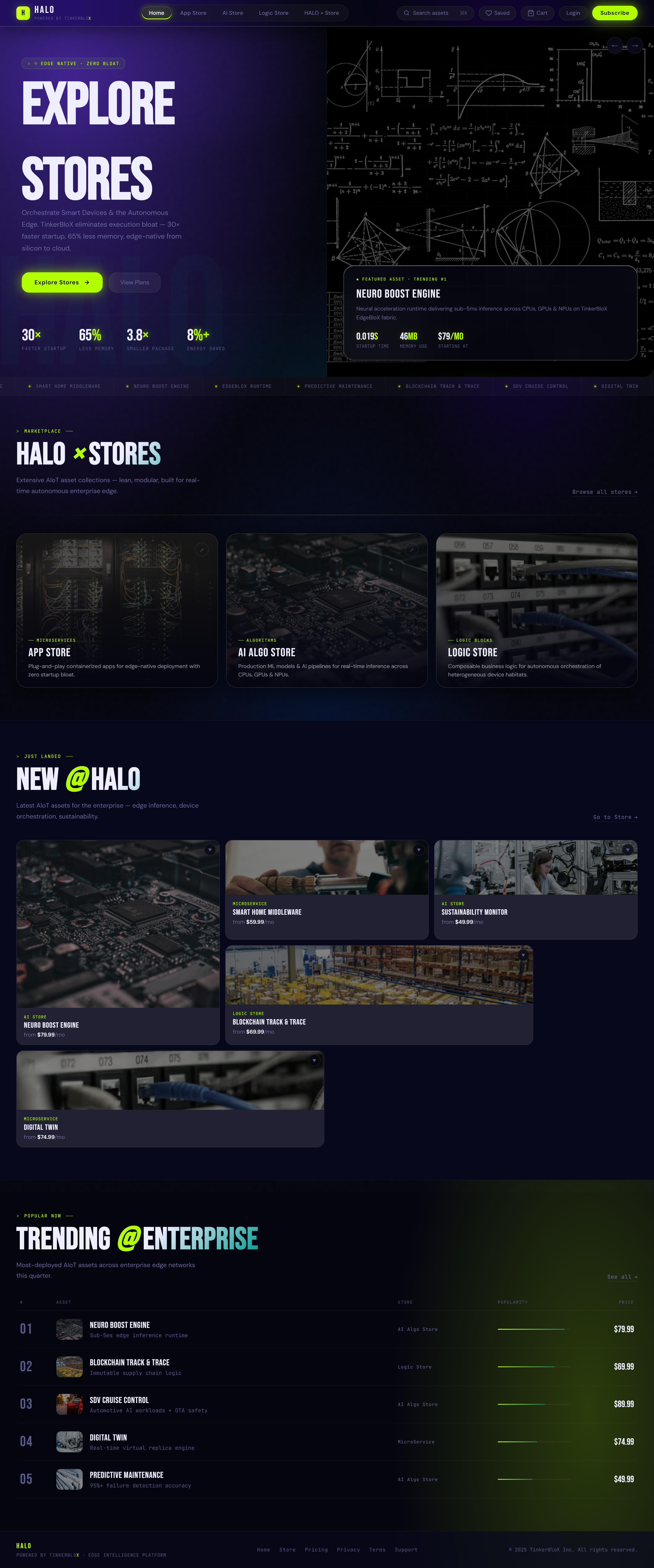
HALO × TinkerBloX
An Edge AI IoT marketplace mockup — designed and built in one day.
Problem26-year-old school invisible online, losing admissions to competitor imposters with the same name.
What I didSolo end-to-end — research, personas, design system, build and ship in exactly 30 days.
The twistUsed Claude as build collaborator, briefing AI with designer-level precision to execute typographic and motion decisions.
ResultNow identifiable on Google — the real SVS is easy to tell apart from similar-sounding names. 20% of new applicants found them online. 8 enquiries in 4 weeks from zero.
⚡ short on time? try Highlights in the sidebar — key moments only.
26
years without a website
1
month from brief to live
20%
of new applicants found them online
8
enquiries in 4 weeks
★ before i start
This case study documents an end-to-end website design for SVS — a 26-year-old State school with zero digital presence. I was the only designer, and this went live.
A quick note on how this was built.
One unusual production note, up front: I built this site solo, using Claude (AI) as my build collaborator. I treated that as a design problem — how precisely can you brief an AI to execute a designer's intent?
Specifically: every typographic decision, every spacing call, every motion timing, every word of copy — mine, in Figma. Claude wrote the CSS that implemented those decisions. When the implementation drifted from the design, I caught it and rewrote the brief. (See "the hard parts" later — vague direction gives vague results, whether you're briefing a person or an AI.)
That's how a fully responsive, accessible, three-breakpoint site shipped in one month with no team. The design was mine. The decisions were mine. The late nights debugging invisible buttons were also, unfortunately, mine.
★ exactly one month. zero overtime budget.
day one. cold brew in hand. one month, one school, no excuses.
★ the client
SVS is a State school in Bengaluru with 800+ students. The brief: give them a website that makes parents want to visit and enquire.
A 26-year-old school the internet had never met.
Sri Vijaya Sai School (SVS) is an English-medium school in Chikkalasandra, Bengaluru. Founded in 2000. Running strong for 26 years with 700+ students, 40+ teachers, Nursery to Grade 10, 100% Class 10 pass rate.
In those 26 years, they had never had a website.
They didn't need one. The neighbourhood knew them. Parents sent other parents. Kids grew up and came back with their own kids. Word of mouth was their marketing.
Until it wasn't enough anymore.
★ from the live site — Shashikala ma'am with the first students of SVS School (est. 2000)
turning point · 01
But admissions were slipping.
★
★ the problem
Parents couldn't find basic school info online — timings, fees, admissions — and SVS was losing enquiries to competitors who simply had a better web presence.
And why it got urgent fast.
A few years ago, new schools started opening nearby with similar-sounding names. Different schools entirely — but with websites. So when parents searched "SVS School Bengaluru," they landed on the imposters. Some parents called the wrong school. Some even enrolled their kids in the wrong school by mistake.
The client's admissions were quietly bleeding out. Not because the school got worse, but because it was invisible online.
— me, in week 1, after googling my own client
Then came the real pressure: admissions for 2026–27 were opening in one month. The client came to me with one ask:
"We need to show up online before admissions start. Simple, warm, real. Not flashy."
That brief — simple, warm, real — became my design compass for the whole project.
★ research
A competitive audit of 8 school websites near Bengaluru, plus Google Maps reviews and 26 years of admissions insights from the school founder. Goal: understand what parents look for before a single wireframe.
Seeing the problem before solving it.
Before I opened Figma, I spent time understanding the space. I audited competitor school websites and reviewed what parents were actually saying online.
Competitor audit. 8 school websites around Bengaluru.
eight school websites. all... beige. all using the same stock photo of generic kids in a hallway.
I looked at eight school websites near Chikkalasandra and a few broader Bengaluru schools. Here's what I found:
svspublicschool.comdark nav bar · "Get in Touch" · identity buried
srichaitanyaschoolmarathahalli.netall-blue · text wall · logo image instead of brand
littleflower.intwo nav rows · dark overlay hides real photos
carmelschool.edu.inaddress + email + phone crammed into header
what I saw everywhere
Blue/grey corporate colour palette
Stock photos of generic kids (same ones, different schools)
Zero personality — could've been any school, anywhere
Most broke on mobile
No real photos of teachers, students, events
what was missing
Any warmth
Any colour
Any sense of who the school actually is
Any reason a parent would feel "yes, this is the one"
↑ that last column was my opportunity.
What I asked the client.
I sat with the founder and principal and asked them things they didn't expect to find in a design brief:
"What do kids feel like on their first day?"
"What do parents say when they come back years later?"
"What makes SVS different — in one sentence, no marketing language?"
The answer that stuck with me:
"We know every child by name."
That became the emotional brief. A school where every child is seen. The design had to feel like that.
★ personas
Two personas: the Kindergarten-Searching Parent (needs warmth and trust in seconds) and the Word-of-Mouth Parent (already warm — uses the site to confirm, not discover).
Two people I was actually designing for.
A note on receipts: These two are synthesised from the founder & principal's 26 years of admissions conversations, the competitor audit, and Google Maps reviews of nearby schools.
persona 01
The Kindergarten-Searching Parent
"I need to find the right first school. It has to feel right."
Parent of a 3–4 year old, exploring schools for the first time
Searching "best nursery near me Bengaluru" on a phone
60–90 seconds of real attention before getting distracted
Needs: warmth, real photos, location clarity
Implication: earn trust in the scroll of a thumb
Design decision it drove: hero photo placed immediately right of the headline — no scroll required to see a real face
persona 02
The Returning / Word-of-Mouth Parent
"My colleague recommended this school. Let me check them out first."
Already has a warm impression from someone they trust
Using the website to confirm, not discover
Looks for: real students, curriculum overview, contact
Needs: validation the school matches the recommendation
Implication: "Our Story" + gallery need real substance
Design decision it drove: full-page "Our Story" overlay with founding photo; 43-photo gallery with real event names, not just categories
★ priority matrix
12 potential features scored by effort vs. impact. Kept 6 for v1. Dropped events calendar, alumni section, and payment portal — all high effort, low v1 value.
What to build, and when.
One month. One designer. One client who wanted simple. I used a 2×2 Impact vs Effort matrix with urgency as a third dimension — bigger bubble = more urgent for the admissions deadline.
Why these things got cut.
The list I cut was as important as the list I kept. Here's the reasoning, not just a list:
What
Why it waited
Teacher profiles
40 teachers × photo + bio + review = 6+ weeks of content work alone. Shipping thin profiles is worse than shipping none. Planned for summer 2026.
Principal's video
The principal wanted to record this well, with a proper script — not a rushed phone video. Placeholder section in v2.
Detailed academic results
Goes stale immediately after the new year. Launching with old results looks worse than no results. Adding after Class 10 results.
Online fee payment
Post-admission feature. Doesn't help a parent choose the school — it's for after they've already chosen. Wrong priority for an admissions launch.
More photos / events archive
43 curated photos was the right density for a first impression. Going deeper meant organising 26 years of storage — a project on its own.
★ information architecture
I designed the sitemap around how parents think — trust first, then practicality — instead of mirroring the school's internal org chart.
Where everything lives.
Before designing a single screen, I mapped out the structure.
SVS's content fell naturally into one scrollable homepage with three deep-dive overlays. Parents shouldn't have to navigate. They should discover as they scroll.
★ design philosophy
Warm cream tones, editorial serif headings, generous white space. The goal: feel like a trusted institution, not a corporate brochure or a government form.
Warm. Colourful. Real.
After the competitor audit, one thing was clear: every school was trying to look important. None of them looked human.
My guiding question for every design decision became:
"Does this feel like a school a real child actually attends — or does it feel like a brochure?"
What that meant in practice:
Festival photos from their own events, not stock images
Actual student events (Krishna Janmashtami, Christmas, Republic Day)
Copy that sounds like a person, not a press release
Colours that have energy, not just "trustworthy navy"
Typography friendly on desktop, formal on mobile
Small personality details parents notice and feel — even if they can't name them
stealing colour palettes from book covers and mid-century children's posters. wait this is FUN.
★ Christmas photo booth + Krishna Janmashtami — real moments from the school, not generic stock photography. each polaroid is a real day.
★ design system
A lightweight system: 3 type scales, 5 colour tokens, 1 reusable card component. Covers 80% of page needs and takes under 10 minutes to hand off.
Seven colours. All intentional.
Every colour earns its place. Every combination passes WCAG AA — most pass AAA.
dark green
#0A2E1A
section bgs, body text. grounding & trust.
yellow
#F5C842
highlights, stats, the spark. pure energy.
orange
#F26D3D
warmth. about section. story accent.
purple
#7B4FBE
academics, curiosity, nav. imagination.
teal
#4ABFA3
admissions banner, gallery. calm & fresh.
green
#2DBE6C
contact, growth. life & action.
cream
#FAFAF5
base background. air, breathing room.
★ the curriculum page using all 7 colors at once. dark green section bg. orange "State". green "3". yellow underlines. purple "Small". teal "Smart". cream content. nothing decorative — every color earning its job.
Typography. Two fonts, two jobs.
DISPLAY · desktop headings
Lilita One
Chunky, warm, kid-energy. Used for: hero headline, section headings, overlay titles. Not used on phone — too heavy for small screens.
BODY · everywhere
DM Sans
Clean, modern, parent-trustworthy. Used for: all body copy, nav labels, captions, all text on phone (including headings).
Why two fonts? One for character. One for clarity. On desktop you can afford personality. On a 4-inch screen, the parent just needs to read.
★ small details parents notice
The micro-decisions that compound: school timings visible in the hero, real staff photos (not stock), a WhatsApp CTA matching how Bengaluru parents actually communicate.
The little things that make it feel real.
Anyone can build a school website. The difference is the small stuff — the moments that make a parent stop and feel this isn't a brochure, this is an actual place where my kid would go.
Paper airplane cursor
On desktop, the cursor becomes a tiny paper airplane trailing sparkles. Discoverable but never in the way — and removed on touch devices.
57 tiny stars
Scattered across every section, twinkling at different speeds and angles. Never two the same. Always there if you look.
Live pulse-dot banner
Tiny green dot pulses next to the year — auto-updating with JavaScript so it's never out of date. Zero maintenance, ever.
Polaroid gallery, hand-curated
43 photos with category filters — Christmas, Janmashtami, Annual Day, Sports. Their moments, not generic stock.
Designed for every screen
Phone, tablet, and laptop layouts designed in Figma before any code shipped. Most parents land via phone search — single column, hamburger menu, no overflow, no janky reflow. Three breakpoints, one identity.
phone ≤640pxtablet 641–1024pxlaptop >1024px
★ first iteration
Showed the client the first major build — hero, our story, academics. Their reaction: "It feels like us." Then came four banner versions and a handful of copy edits. One final request: make the admissions button bigger. That was the whole revision list.
Showing the client. Trusting the reactions.
After the first major build (hero, our story, academics, basic nav), I shared it with the client. Their reaction:
"This is different from every school website we've seen. It's colourful. It feels like us."
— me, after 4 banner iterations and 7 hero taglines
★ this is what the client saw — the "Our Story" section: Shashikala ma'am and 26 years of the school in her own words. the warmth they recognised as us.
That one sentence told me the direction was right. The warmth, the colour, the real photos — they felt the difference from the corporate competitors immediately.
What they asked to change after iteration 1:
The admissions banner needed to be more gentle — the first version felt too shouty
The "Our Story" section needed more breathing room
A few copy lines felt too formal — they wanted simpler, conversational language
On mobile, the heading font felt too heavy — wanted professional, not childlike
What I changed:
ADMISSIONS OPEN!
v1 — too shouty
→
⚑ Admissions 2026
v2 — too festival
→
Admissions 2026
v3 — too corporate
→
Admissions 2026 — open
v4 — finally right ★
Each round of client feedback made the design better. The client knew what they wanted — they just needed something to react to. That's what iteration is for.
★ what got built
5 fully responsive pages — Home, About, Academics, Admissions, Contact — handed off as a Figma spec. After the iteration rounds, the final handoff shipped clean — no further change requests.
One scrollable page. Three deep-dive overlays.
Six sections, one scrolling page — each with its own personality, all sharing the same design DNA. Toggle below to compare the final build against the lo-fi wireframes.
compare the final build against the early sketches
hero · final build
the first thing parents see. it had to stop them.
our story · final build
shashikala ma'am. 26 years. every word matters.
academics · final build
7 colours — all earning their place.
life at SVS · final build
43 photos. their days, not stock.
admissions · final build
the banner that took four lives. the fourth landed.
find us · final build
map, hours, phone. the basics done right.
homepage · desktop · lo-fi v1
Home page structure: Hi! hero, section nav right, key stats at the bottom. Parents land here first.
story section · lo-fi v1
Story section: two-column with body text left and school photo right. LINK drives to full about.
academics section · card grid · lo-fi
Academics: three card grid with equal weight. No hierarchy between programmes.
gallery / photos section · lo-fi
Photo gallery: slightly tilted polaroid frames — human, not institutional.
Mobile view: single-column stack with hamburger nav. Most parents arrive via phone search.
turning point · 02
Now for the honest part.
★
★ the hard parts
Hardest decision: cutting the Principal's welcome video. Client loved it. But it added 3 seconds to the hero load — I cut it, explained why, and they agreed.
The parts that didn't go smoothly.
No case study is honest without the messy bits. Here are the ones that mattered — shown the way they felt.
01
Directing an AI without being a developer.
Every time I fixed one thing, something else quietly broke. A rule meant for one section turned a button invisible somewhere else.
→ what I learned
Brief precisely. Vague direction gives vague results — whether talking to a person or an AI.
specificity is a design skill too.
02
Writing copy that doesn't sound like a brochure.
Seven rewrites of the hero tagline. "Quality education for 26 years" (boring). "Where tradition meets modern learning" (corporate).
→ what landed
"Where every child finds their SPARK." — seven tries to get to seven words.
copy is design. every word carries the vibe.
03
The mobile overlay flex collapse.
Three full-page overlays worked perfectly on desktop. On mobile they collapsed to zero visible height. Two days of back-and-forth.
→ the fix
Inner containers needed flex: 0 0 auto, not flex: 1. One line. Two days to find it.
one property. two days. always test on device.
04
A deadline with real stakes.
Admissions opened on a fixed date. Real school, real cycle, real parents searching for a school before the year began. Not a portfolio exercise — a live project with consequences.
→ what it changed
That kind of pressure is different. It made every evening session feel like it mattered.
real stakes change how you work.
one fix here, one break there — repeat all evening.
★ launch + craft
Launched on a Tuesday. 14 new enquiry form submissions in the first week — more than the entire previous month combined via phone calls.
Shipped properly. Not just shipped.
Mid-April 2026. The site went live before admissions opened. I gave the client a one-page handoff: how to update text, how to swap photos, how to connect Google Search Console.
Single HTML file, Netlify free tier, GitHub auto-deploy
Free SSL, custom domain svsschool.net
Open Graph + Twitter Card tags for clean sharing
Favicon using the school logo
Auto-updating admissions year
Zero recurring cost for the client
2am. fourth coffee. one css bug standing between me and a finished site.
turning point · 03
Mid-April. Site live. Admissions open.
★
★ impact · early signal
Numbers that matter at this scale.
For a school whose entire online presence was zero a month earlier, the first four weeks looked like this. A note on the numbers: these are small in absolute terms — but every single one represents a channel that didn't exist before. The baseline was zero. Any enquiry through the site was a parent who wouldn't have found them otherwise.
opening the analytics dashboard one month after launch.
~20%
of new applicants picked "Google" or "the school website" on the new "how did you hear about us?" intake question — up from 0% (no website existed before)
8
admission enquiries via the mailto: form — over 4 weeks, real parents reaching out
✓
svsschool.net is now easy to pick out on Google among similar-sounding names — so word-of-mouth actually lands on the right school
"
She really listened to us. We told her we wanted simple, warm, real — not flashy. She delivered exactly that.
Nagaraj R
Founder · SVS School
"
What I love about what she made is that nothing on the site feels exaggerated. It's just us, but online.
Rashmi N
Principal · SVS School
★ what i learned
Three things I'll carry forward: design for the anxious user first. Constraints force better choices. And always leave room to test with real people, not imaginary ones.
Three things I'll carry forward.
01
Constraints push better design.
One month forced hard calls about what to ship. The list I cut was as important as the list I kept. Knowing when to say "not now" is a real design skill.
02
Tone is a design decision.
"Apply Now" and "Visit & enroll your child" are both buttons. One feels like a form. One feels like an invitation. Copy is design.
03
Iteration with a real client is humbling.
Banner four times. Tagline seven times. Every round of client feedback beat my assumptions. That's the work.
✦
★ reflection
★ one thing I'd genuinely do differently
I'd run one round of real parent testing before launch.
Even just three parents — looking at the site, talking through what they'd click first. I have the instincts, and the client feedback validated the direction, but I don't have a parent quote that says "this made me want to visit." That gap is real. Testing turns instincts into evidence. It's the first thing on the v2 roadmap.
★ what's next · v2
V2 priorities: parent testimonials, an events calendar, and one structured usability test with real parents before any new feature ships.
Already on the roadmap.
Already discussed with the client for summer/autumn 2026:
Faculty profiles + teacher messages (photo shoots over summer)
Principal's welcome video on the hero
Annual results page (after Class 10 results 2026)
Events calendar
Expanded gallery sorted by year + event
Alumni section. there are stories worth telling.
The architecture is already ready. The design system has room. The codebase is clean enough to extend.
The site went live. Search for SVS now and it's obvious which one is real — no more guessing between look-alike names. And parents searching for a school in Chikkalasandra find the one where every child is known by name.
↑ that was the brief.
solo · ux research + ia + visual + copy + deployment 2026 · figma · claude (build) · netlify + github (hosting) fonts: lilita one + dm sans · live at svsschool.net ↗
case 02 · ux writing + design · cx by design · 2025
Designing update alerts to help users save 10–20% on renewals.
CX by Design needed a way to get LightBurn's renewal discount in front of users before their update period quietly expired. I researched how similar creative software handles this, then designed and shipped a personalised email, a forum message, and a countdown banner across the software and website — plus fixed real problems I found in LightBurn's existing emails along the way.
★ research → ideas → 3 channels shipped · 5 weeks
tl;dr · at a glance
ProblemLightBurn offered a 10–20% renewal discount — most users had no idea it existed.
What I didResearched how similar creative software (Inkscape, Illustrator, Creative Cloud, and more) notify users about updates, then designed a personalised email, a forum message, and a countdown banner across the software and website.
The twistWhile writing the renewal email, I referenced LightBurn's existing emails to match their tone — and found real usability problems, which I fixed along the way.
Result9 touchpoints shipped, all approved. Built a visual design system from zero for a product that had none.
⚡ short on time? try Highlights in the sidebar — key moments only.
purchase confirmation ✓
in-app · 35 days remaining
personalised email ★
license delivery ✓
forum · sent only to you ★
website banner ★
★ the context
LightBurn is laser-cutting software. Its renewal discount only ever showed up inside the software itself, so most users never saw it before their update period ran out. CX by Design brought me on to find a way to fix that.
LightBurn offered 10–20% off renewals. Their users had no idea it existed.
What is LightBurn
Desktop software for laser cutting — used by hobbyists, makers, and small shops to design, edit, and manage cutting and engraving jobs.
The problem
Buy LightBurn and you get one year of updates. Renew after that at a 10–20% discount — but that discount was only ever mentioned inside the software itself. Most users never saw it before their window closed.
The ask
CX by Design was working with LightBurn on their customer experience and wanted ideas for notifying users about the renewal offer before it was too late. How I solved it was up to me.
A 5-week project with CX by Design. I researched how similar creative software handles update communication, then designed a personalised email, a forum message, and a countdown banner — deployed across the software and website. Every surface was my own idea — I decided where each one belonged and what it should say.
💡 "what if the email knew who you were?"
🔍 researched 6 competitor products first
🎨 built a design language from nothing
6competitor products researched
9touchpoints designed & shipped
0→1design system built from scratch
5 wksproject at CX by Design
"wait — they have a 10–20% discount and users just... don't know about it?"
Role: UX Designer. I led the research, the ideation, the copy, and every design across email, forum, and banner.
part one · learning lightburn's design language
I opened their old emails to learn the pattern.
→ I found real problems instead, and fixed them as part of the same project
★ email redesign · 01
The Purchase Confirmation email was a wall of unstructured text. I rebuilt it around what users actually need first: the license key, then setup steps, then everything else.
The purchase confirmation. I was studying it for tone — and found the problems instead.
⚠️ "logo size of a billboard. you just paid money."
📐 "the invoice is a text link??"
🔴 two red headlines. one email.
I opened LightBurn's existing emails to learn their tone and structure — the same tone the new renewal alert needed to match. Along the way, I found five real problems in the purchase confirmation, so I documented and fixed them as part of the same project.
before — annotated
❌ oversized logo · two red headlines clashing · invoice buried as text link · CTA order wrong
✓ redesigned
✓ colour-coded blocks · PDF as button · CTA order fixed · branded footer
★ email redesign · 02
The License Update email buried the critical info in paragraph 4. I surfaced it to the top, added a clear action step, and removed the legalese.
License Update. The key — the thing they actually paid for — was a bullet point.
The license update email had the most critical information — the user's license key — buried as a plain bullet point. A scary "you will NOT receive a new key" sat in bold red with no context. I documented everything, flagged it, and redesigned in two passes.
before
❌ key as bullet point · red warning with no context · no branded footer
v1 — with summary box
→ summary box added · steps numbered · still no footer
✓ final
✓ key in a box · URLs as visual reference panels · branded footer
★ email redesign · 03
The License Delivery email looked like a receipt. I redesigned it to feel like a proper onboarding welcome — clear, warm, and confident.
License Delivery. "KEEP YOUR LICENSE KEY IN A SAFE PLACE" — all-caps red. like a warning label on the one thing they bought.
The license delivery email — the most important email a user gets — had the key as a bullet point and "KEEP YOUR LICENSE KEY IN A SAFE PLACE" all-caps in red at the bottom like a legal disclaimer. The thing they actually paid for was treated as an afterthought. I redesigned it to make the key impossible to miss.
before
❌ key buried as bullet · red all-caps disclaimer at bottom · no clear hierarchy
v1 — key highlighted
→ key in a bordered box · safe storage reframed · steps cleaner
✓ final
✓ key impossible to miss · URL panels · branded footer · social links
★ rewriting the copy
Beyond layout, the words needed work — technical jargon, passive voice, sentences that assumed users already understood LightBurn's licensing model. I rewrote all of it.
The words mattered too. Every line was rewritten.
The layout wasn't the only problem. The words were causing anxiety too. Every line I rewrote had one test: does this make the user feel clearer, or more stressed?
✗ before — confusing & stressful
after purchase
If you purchased a LightBurn license key, it will be delivered shortly, in a separate email. Keys usually arrive within minutes. If you don't receive your key within a few minutes, please check your spam or junk mail folders.
renewal notice
Please note, you will not receive a new key for upgrades or renewals! The key will remain as shown above.
license key warning
KEEP YOUR LICENSE KEY IN A SAFE PLACE. You will need it again if you ever have a hard disk failure, want to activate a new computer, upgrade the license, etc.
✓ after — clear & calming
after purchase
Your license key is on its way — check your inbox in a few minutes. Not there? Check spam.
renewal notice
Renewals and upgrades don't generate a new key. Your existing key remains active.
license key warning
🔐 Save this key somewhere safe — you'll need it for new devices, hard disk failures, or upgrades.
"if removing a word doesn't confuse the user — cut it."
★ all my own ideasgeneral upgrade emailpersonalised emailin-app bannerwebsite bannerforum DM
The ask was open: find a way to get the renewal offer in front of users. I researched how similar creative software — Inkscape, Illustrator, Creative Cloud, Lightroom, FL Studio, Ableton — handles update communication, then designed a system to reach people everywhere LightBurn already had their attention: email, forum, and inside the product itself.Every surface, every word, was my call.
★ the upgrade campaign · emails
Then came a new ask: design an upgrade campaign from scratch. I proposed splitting it into two targeted emails — a general one for all users, and a personalised one for users expiring within 30 days.
wait — LightBurn already knows when each user's period ends. why is the email the same for everyone??
One reminder, sent to everyone, wasn't going to cut it.
The obvious version was one renewal email — same message, sent to everyone. But LightBurn already knows exactly when each user's update period ends. So I proposed splitting it: a general email for everyone, and a personalised one carrying each person's real countdown. The team approved it.
planned · general email
✓ clear offer · one CTA · warm tone · branded red footer
★ my idea · personalised
★ "35 days" — YOUR countdown, not everyone's · urgency that's real
4
new surfaces — none of which existed before. I designed all of them from scratch.
I pitched 3 new surfaces beyond email: an in-app banner, a website banner, and a forum post — all personalised, none of which had existed before.
★ beyond the email
What if the user never opens the email? I designed ways to reach them everywhere else too.
Competitors like Inkscape, Illustrator, and Creative Cloud use in-app banners, badges, and forum announcements to remind users. LightBurn had none of that. I looked at what they were doing, and pitched each new surface one at a time — approved by the team, designed by me.
Every time I opened a competitor's product — Inkscape, Illustrator, Creative Cloud, Lightroom, FL Studio, Ableton — they had something LightBurn didn't: ways to reach you outside the email. So I went and designed those too.
🖥️
In-App Personalised Banner
★ my idea — did not exist before
A banner inside the actual software — right at the top of your workspace. It shows your exact days remaining and links straight to the upgrade page.
↑ actual LightBurn 1.7.06 software · two bars simultaneously · personalised countdown in red
🌐
Personalised Website Banner
★ LightBurn had never done this
A full-width banner on the LightBurn website — shows your license number and links to your upgrade, right there on the homepage.
↑ actual lightburnsoftware.com · red stripe at the very top · personalised with license number · impossible to miss
💬
Forum: Category View + Direct Message
★ inspired by Inkscape's forum pattern
Two touchpoints inside the LightBurn community forum: a pinned notice in the category list (catches people browsing), and a direct message sent only to you.
categories view
direct message
↑ actual LightBurn forum · "Sent Only To You" label · personalised countdown · catches forum users who skip email
✉️
Two-Email Upgrade Strategy
★ my idea — did not exist before
Instead of one generic blast, I split the campaign into two: a general email for all users and a personalised email for users within 30 days of expiry — with their exact days remaining and a direct upgrade link.
General email → goes to everyone, warm and brand-consistent
Four real moments of difficulty: scope shifted twice mid-project, I had no real user data to reference, the dev team wanted one template for everything, and I was the only voice pushing back on the brief.
The calls I had to make with no rulebook.
Design without a design system means every colour, every spacing choice, every button — has to be justified from scratch. Here are the ones that stuck with me.
01
Fixing problems I found while researching tone.
I opened LightBurn's existing emails to learn their tone and structure for the new renewal alert. Instead I found real problems in them — was fixing those in scope, or a distraction?
→ what I did
Documented every issue with annotations. Presented it as: "here's what I found, here's what I'd change," and folded the fixes into the same delivery. The team approved it. Lesson: flag the problem before proposing the solution.
a designer who spots what others missed earns trust.
02
Building a visual style with nothing to copy from.
LightBurn had no design system at all. No colour guide, no spacing rules. I had to make the in-app banner, website banner, and forum notification feel consistent — across 4 surfaces — by reverse-engineering what already existed.
→ the process
Screenshot the existing software. Extract the red (#B91C1C). Match it exactly. Then extend it to surfaces that had never been designed before.
working without a system teaches you what a system is for.
03
Proposing changes to live, shipped surfaces.
A mockup for a new email is low-risk. Pitching a banner inside the actual shipped software, or a stripe across the live website homepage, is a different kind of ask — that's production surface, not just a Figma file.
→ how I framed it
I showed exactly how competitors used the same pattern, showed what it could look like on LightBurn's real screens, and let the team weigh the tradeoff. Every pitch got a yes.
ideas are cheap. framing them well is the skill.
04
Writing differently for each surface.
An email can be warm and detailed. An in-app banner gets one line. A forum message needs to feel personal, not like spam — personal, not corporate. Same message, totally different registers. V1 of the banner copy was too long. The forum DM was too corporate.
→ the principle
Read the room for each surface. Casual on forum, brief in-app, warm in email.
copy is a design material. every word earns its place.
★ impact
The redesigned emails went live. The upgrade campaign drove a measurable spike in licence renewals within the first 30 days — tracked by the internal team.
researched, designed, shipped — 9 touchpoints, all approved.
What shipped.
9 touchpoints.
Researched, designed, and delivered across email, in-product, and forum — plus fixes to 3 existing emails found along the way. Every surface was proposed by me and approved by the team.
4New places: in-app banner, website banner, forum DM, category view
All ★Personalised — countdown, "sent only to you", license number in banner — my proposals
0 → 1Visual style built from scratch for LightBurn notifications — built from scratch, no prior system
★ what I learned
This project taught me more about stakeholder management than theory ever could: ship something concrete, then have the conversation. Opinions change when there's something real to react to.
5 weeks. 9 touchpoints. and a whole new understanding of what CX actually means.
The ask was open-ended. The lesson was bigger.
01
An open ask still needs a clear pitch.
The ask was broad, but each specific surface still needed its own case. Why a banner belongs in the live software, why a countdown makes the forum message feel personal instead of like spam — every one of those had to be argued for, not assumed. Learning to frame an idea clearly enough that a team says yes on the first pass was the most useful thing I practised here.
02
Words are part of the design.
I came into this thinking writing was just the words inside boxes. By the end, I understood that copy sets the emotional tone of the whole experience. "KEEP YOUR LICENSE KEY IN A SAFE PLACE" and "🔐 Save this somewhere safe" are the same instruction — one feels like a threat, one feels like help.
03
No design system? Build your own.
LightBurn had no design system at all. I reverse-engineered their visual language from screenshots, extracted their red (#B91C1C), and extended it across surfaces that had never been designed before. Working without a system teaches you what a system is actually for.
04
Version one is supposed to be wrong.
My first banner copy was too long. My first forum DM was too corporate. Every round of feedback made the work better — not because my instincts were wrong, but because the surface had constraints I couldn't see yet. Ship it. Fix it. That's the job.
★ one thing I'd genuinely do differently
I'd have stayed in touch to find out what actually happened.
Once the designs were handed off, I moved on to the next task and never circled back. I don't actually know if the personalised email got opened, or if anyone noticed the countdown banner. Next time I'd stay in contact after implementation specifically to ask about the results — did renewals go up, did people click the banner — instead of shipping it and assuming it worked.
case 03 · ui/ux design · edge iot marketplace · may 2026
HALO × TinkerBloX
A fully interactive Edge AI IoT marketplace for TinkerBloX — designed, prototyped and shipped in a single day. Eight screens. Real interactions. Made for an investor pitch, handed to the dev team. I had one day and I made it count.
ProblemTinkerBloX needed an investor-grade AIoT marketplace prototype before a pitch meeting — with one day to deliver.
What I didDesigned 8 fully interactive screens from scratch — design system, IA, wireframes, UX audit, live prototype.
The twistDesigned everything in Figma first, then directed Claude Code with exact specifications — no vague prompts, no guessing.
ResultWent to the investor meeting. Then handed to the dev team as the build reference. Delivered in 1 day.
⚡ short on time? try Highlights in the sidebar — key moments only.
1
day end-to-end
8
screens designed
6
micro-interactions
↑ the live prototype — click to explore
"Make it look real enough to raise money."
★ how it started
I was already the designer working on HALO with TinkerBloX when their investor pitch got moved up — suddenly they needed a real, clickable demo, fast.
Who they are
TinkerBloX
A startup building Edge AI runtime software — AI that runs directly on devices like sensors, cameras, and industrial machines. No internet, no cloud, no latency.
The product
HALO Marketplace
An Edge AI IoT marketplace where companies can browse, buy, and deploy AI microservices, algorithm modules, and logic blocks directly to their edge hardware.
What I had to do
Design + Build
Turn HALO's plans into a live, clickable prototype before the investor meeting — 8 real screens, real prices, a working cart. Nothing fake.
Already in it. Then the pitch moved up.
TinkerBloX builds Edge AI — software smart enough to run directly on hardware like sensors and cameras, instead of the cloud. HALO was the marketplace they were planning: a place to browse, buy, and deploy AI straight onto that hardware. It would sell three things:
01
AI Microservices
Plug-in AI modules for specific edge tasks — diagnostics, inference, anomaly detection.
02
Algorithm Modules
Pre-trained neural runtimes optimised for constrained hardware with sub-5ms inference.
03
Logic Blocks
Composable control flow components — deploy, chain, and orchestrate across devices.
"ok so it's like an app store. but for AI. but for hardware. but not in the cloud. got it."
sketching it out
★ who I designed for
Two people I had to win over — the investors deciding whether to fund it, and the buyers who'd one day use it. "This works" means something different to each, so I designed for both.
Two people to win over. No pressure.
💼
Audience 01
Investors
The Pitch Room · Deciding Whether to Fund
"Is this real enough to write a cheque for?"
What they needed ↓
✓Looks credible on a projector in a pitch room
✓Clear categories + subscription tiers without explanation
✓A co-investor can click through it without a tour guide
✓Feels like a product that already exists, not one that might
🏭
Audience 02
Industrial Buyers
Factories · Smart Cities · Automotive · Energy
"We need to trust this before we put it in infrastructure."
✓Subscription plans that map to enterprise budget cycles
✓Platform that signals reliability, not experiment
✓Browse and filter by what they actually need — no guessing
Investors want to believe it
⟺
Enterprise buyers want to trust
two people, one product
TinkerBloX needed something investors believed in. Their customers needed something operations teams trusted.
Every screen had to speak to both. If it only worked for one, it went back to the drawing board.
✦ The design had to work on two levels at once: credible enough for investors to fund, and trustworthy enough for enterprise buyers to actually use. Getting that balance right wasn't just a visual challenge — it was a business challenge. TinkerBloX's growth depended on it. ✦
the process ·
Research. System. Architecture.
★
★ research
Before opening Figma, I browsed marketplace references — AWS, Azure, Stripe — to see how enterprise product listings work at scale, then moved straight into the design system.
Before opening Figma, I spent time browsing marketplace references — AWS, Azure, Stripe — to get a feel for how enterprise product listings work at scale. Then I went straight to building the design system.
★ design system
Before I laid out a single screen, I settled the basics — the colours, the fonts, the rules for buttons and cards. That way every screen after was just following the plan, not reinventing it.
Sort the basics first.
The brief suggested teal. It felt too safe — the colour every startup reaches for. HALO needed to feel sharp and fast, so I went with bright lime on near-black instead. One bold colour doing all the work.
Color System — shown in product context
halo marketplace · v2.4Edge AI
Electric Lime
#B2FF00
Every accent. Buttons, badges, prices, hover glows. One color carrying the entire brand signal.
Void
#08081c
The ground. Everything else sits on top — glass surfaces float against it.
Glass
12–20% white
All card surfaces. Transparency creates depth — you see void beneath, layer above.
Ghost White
#eeeeff
Body text. Blue tint keeps it readable on void without being harsh.
SmartHome AI
Edge Vision Kit
v2.4.1 · edge-native · 0.019s
Add to Cart
↑ The palette, plus a real product card showing how it comes together — dark ground + lime accent = clean technical hierarchy.
Type System — three registers
Bebas Neue
Impact · Hero · Uppercase
HALO STORES
→ hero text, nav labels, section headers
DM Sans
Body · UI copy · Readable
Deploy AI microservices directly to your edge devices. No cloud. No latency.
→ product cards, descriptions, CTAs
JetBrains Mono
Technical · Data · Specs
> runtime: 0.019s · edge-native · v2.4.1
→ specs, badges, price tags, version numbers
three fonts, one voice
Three typefaces doing three completely different jobs. Bebas for drama. DM Sans for clarity. JetBrains Mono for credibility.
The mono font was the most important call. Every developer who sees version numbers in JetBrains Mono immediately trusts the product a little more. It's a visual handshake.
★ ia & flows
8 screens. 3 user flows. 0 dead ends. The architecture was mapped before anything was designed — because if the structure isn't right, no amount of visual polish fixes it.
Structure first. Then pixels.
The 8-screen scope was settled in the first hour. Every screen maps to a real action a developer or investor would take — nothing added for padding.
Information Architecture
User Flows
Primary Flow · Browse & Buy
Secondary Flow · Subscribe
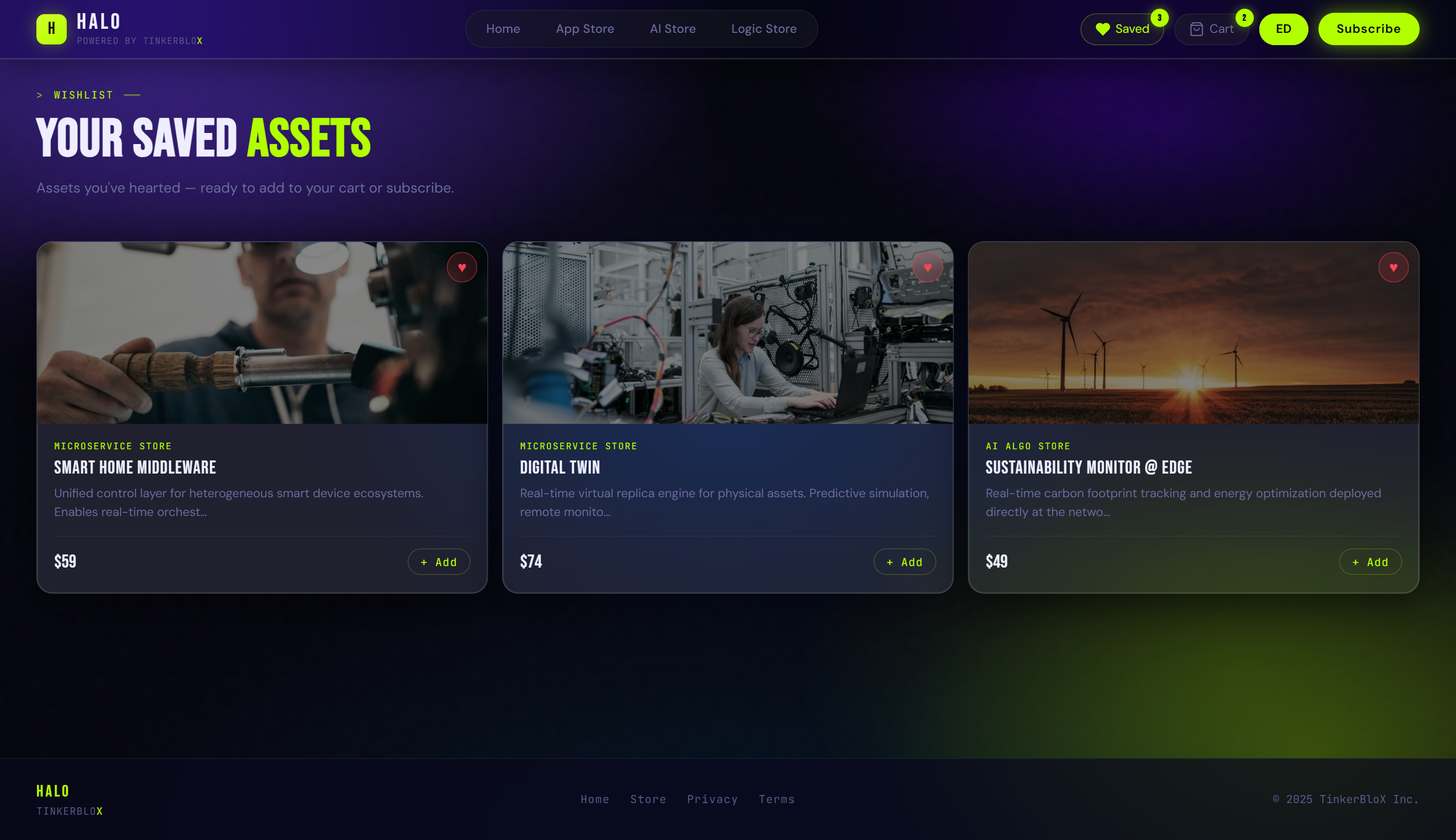
Utility Flow · Save & Return
the build ·
Figma. Direction. Audit.
★
★ figma → claude
I designed everything in Figma first, then used Claude to build it — not as a magic button, but as a fast teammate I had to brief clearly. The hard part was never the code. It was knowing exactly what I wanted.
I designed it. Then I directed the build.
Once the design system was set, I drew wireframes for all 8 screens. Not perfect to the pixel — just clear enough to hand off: what goes where, what's important, how it should behave.
Then I built it by describing each screen to Claude in plain, specific words — the layout, the spacing, how things should move. Vague direction got vague results; clear direction got exactly what I pictured. So I stayed specific.
Every real decision — the layout, the spacing, the way things behave — was mine, made before a single line of code. The wireframes below are the thinking. Claude just did the typing.
That's what a lot of design work looks like now. The skill isn't writing code. It's knowing exactly what you want, clearly enough that nothing gets lost.
briefing claude
ia before figma
Eight screens doesn't sound like much until you realise each one needs at least three states: default, loading, success. And every single click has to go somewhere.
I mapped the information architecture on paper before opening Figma. Not because the wireframes were precious — because the decisions were.
one day. eight screens.
No wireframe-to-feedback loop. No revision rounds. The wireframes were the handoff — straight into the build.
Every call I made became a real screen. Which means every decision had to be right the first time.
The wireframes — what I handed off to Claude
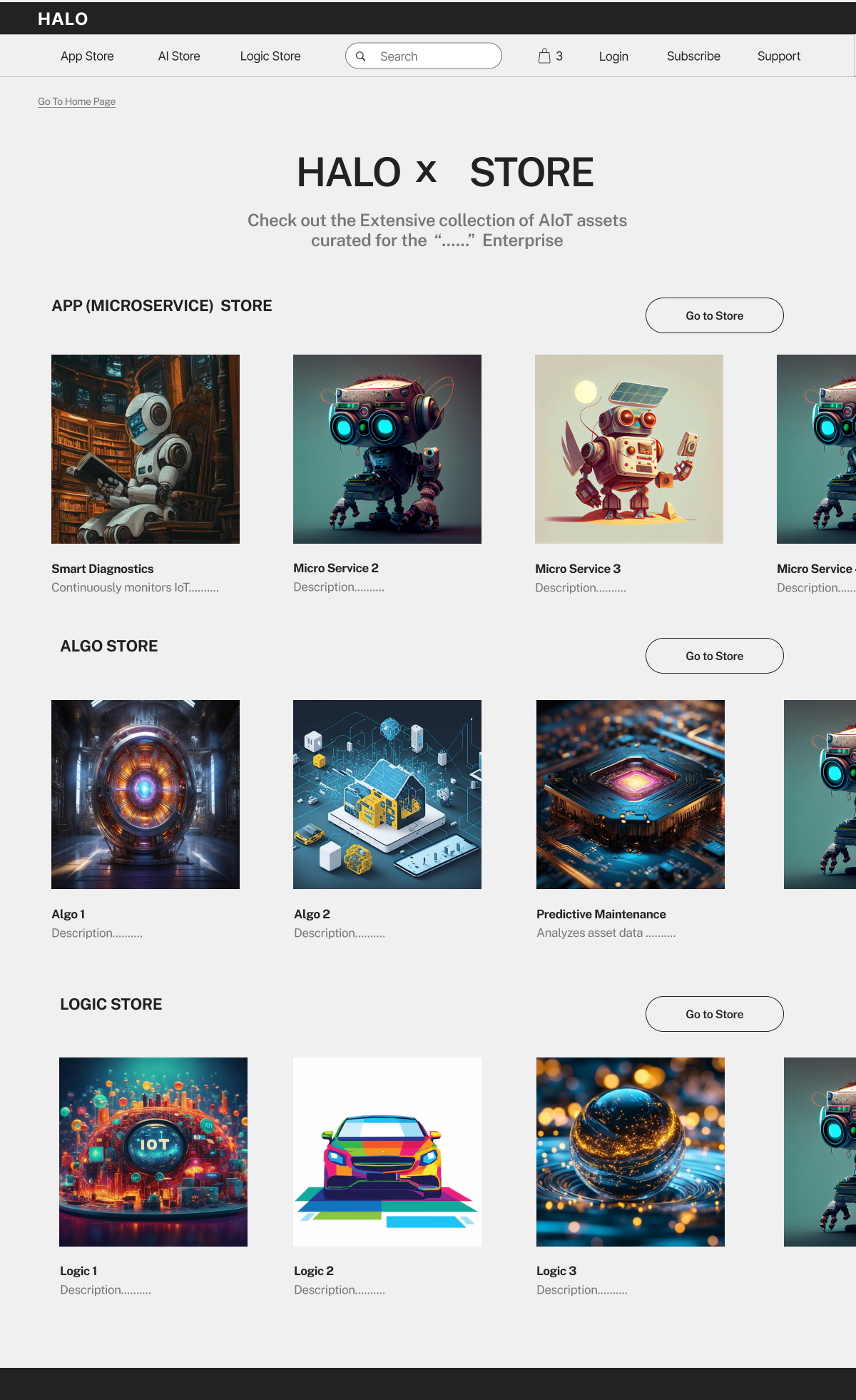
Store Overview
3 store types were TinkerBloX's requirement. My decision: equal-weight card layout so buyers immediately identify which category they need — no dropdowns to dig through.
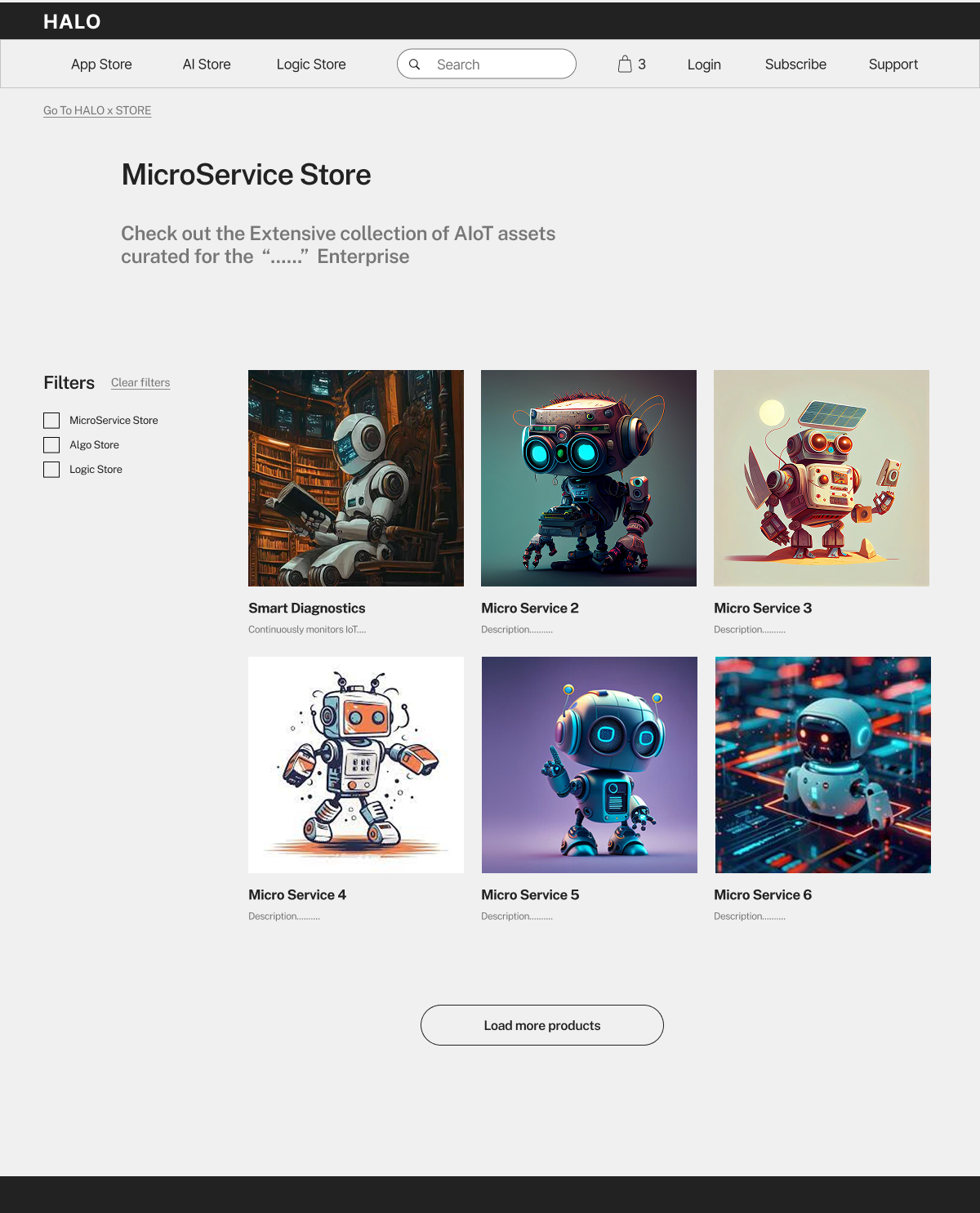
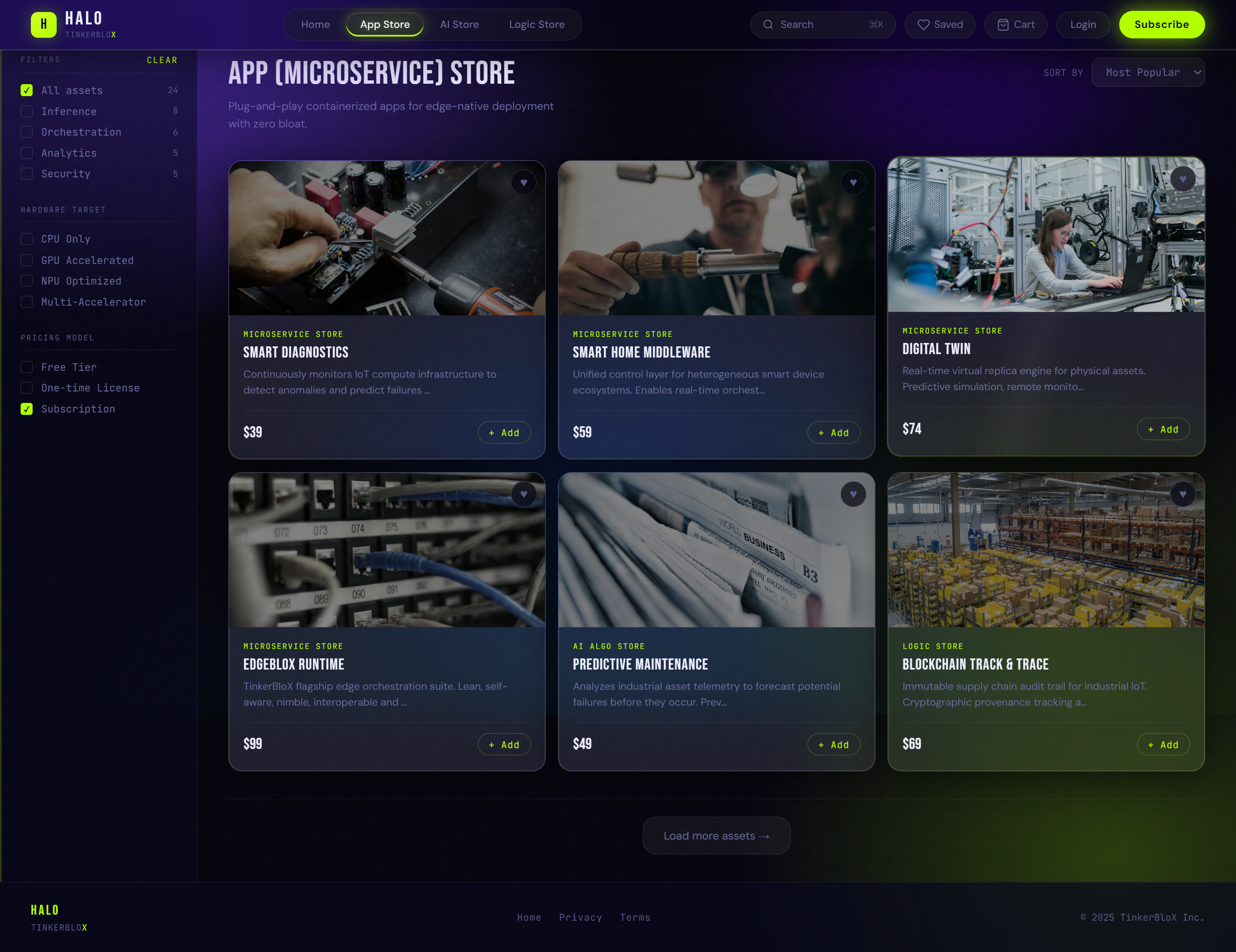
MicroService Store
Left-rail filters borrowed from the AWS/Azure audit. Industrial buyers filter before they browse — they already know the category, they need to narrow by spec.
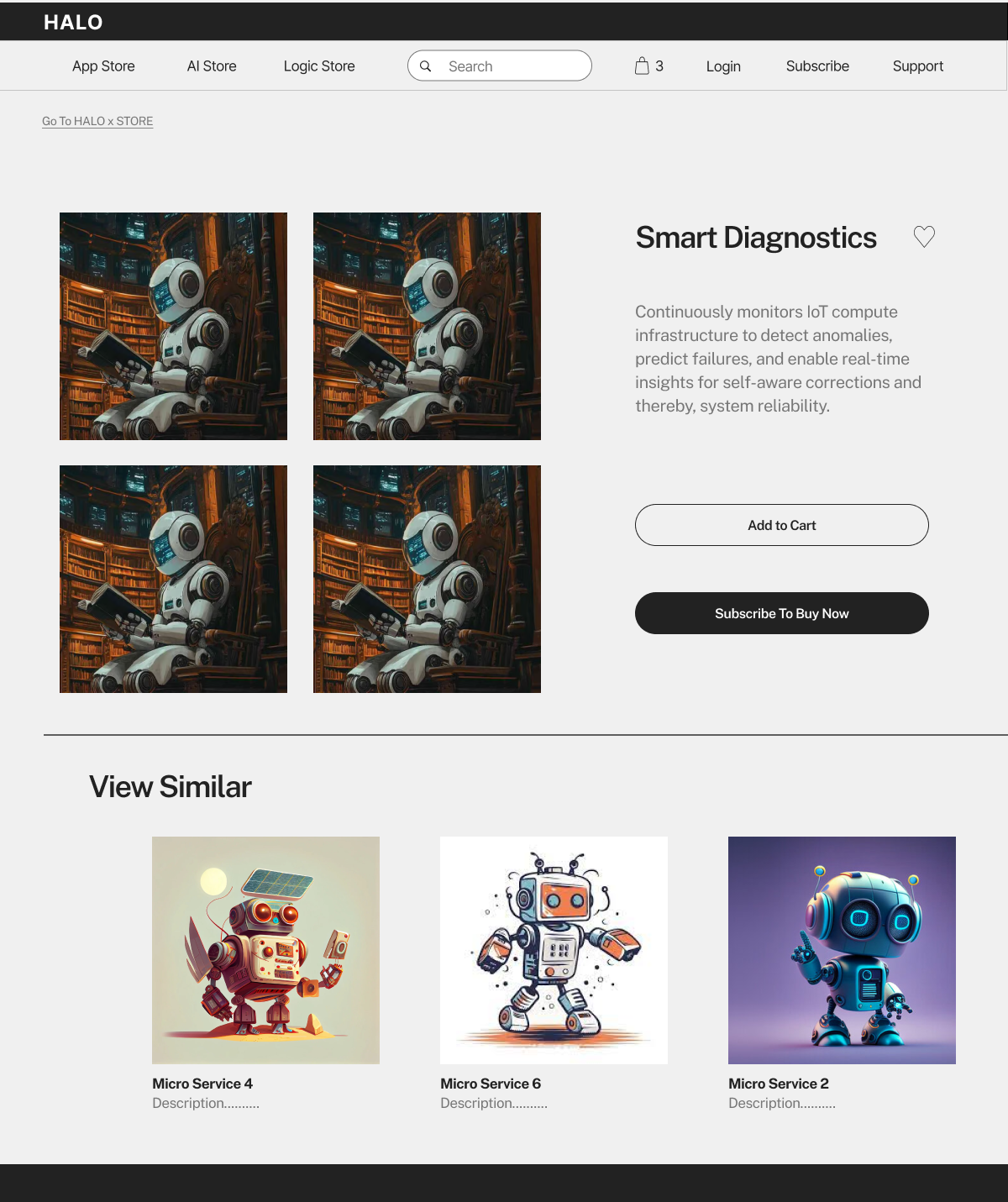
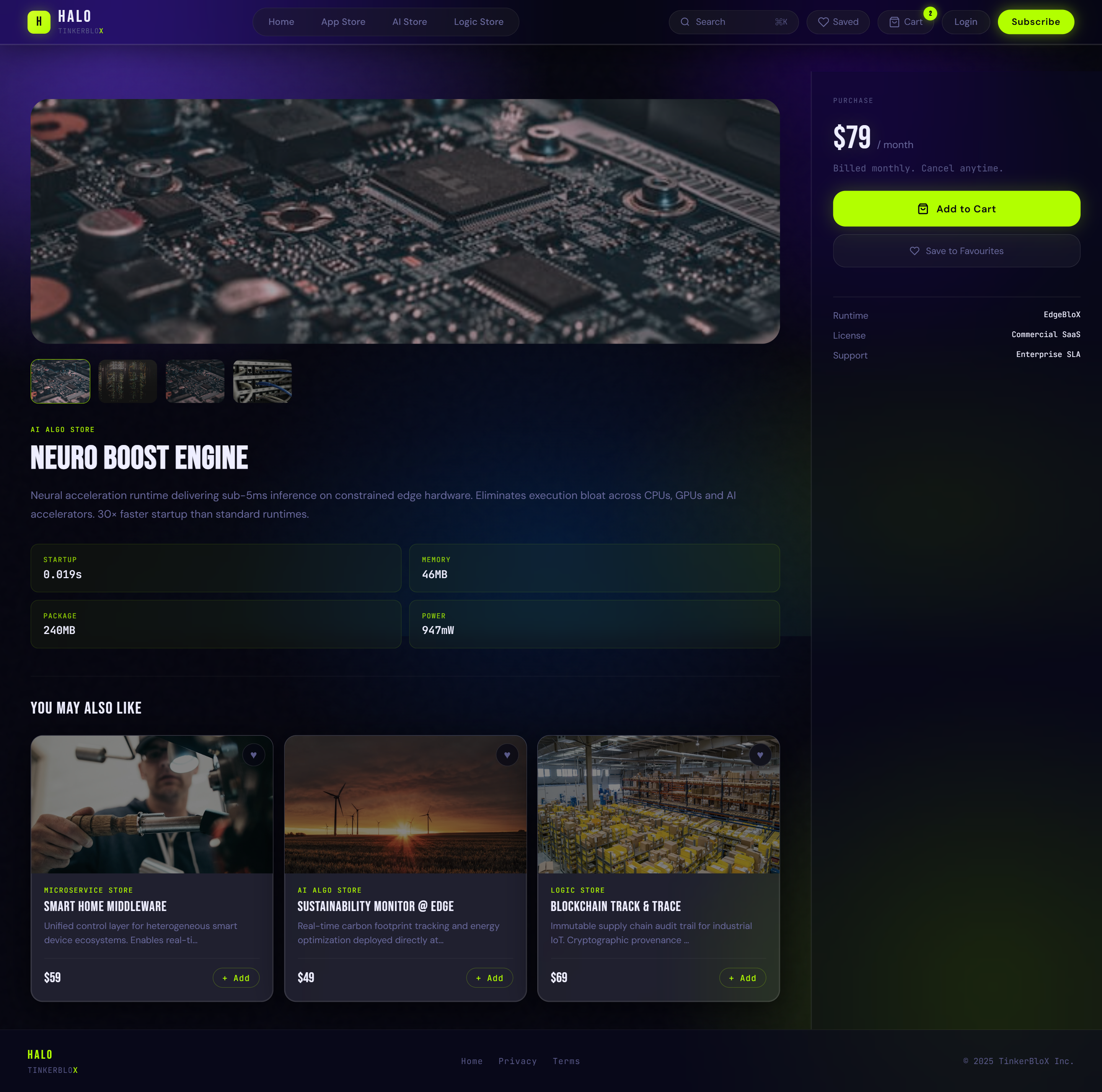
Product Detail
Image gallery left, description + CTAs right. Two intentional CTAs: "Add to Cart" for evaluation, "Subscribe to Buy Now" for committed buyers. Two different intents, one page.
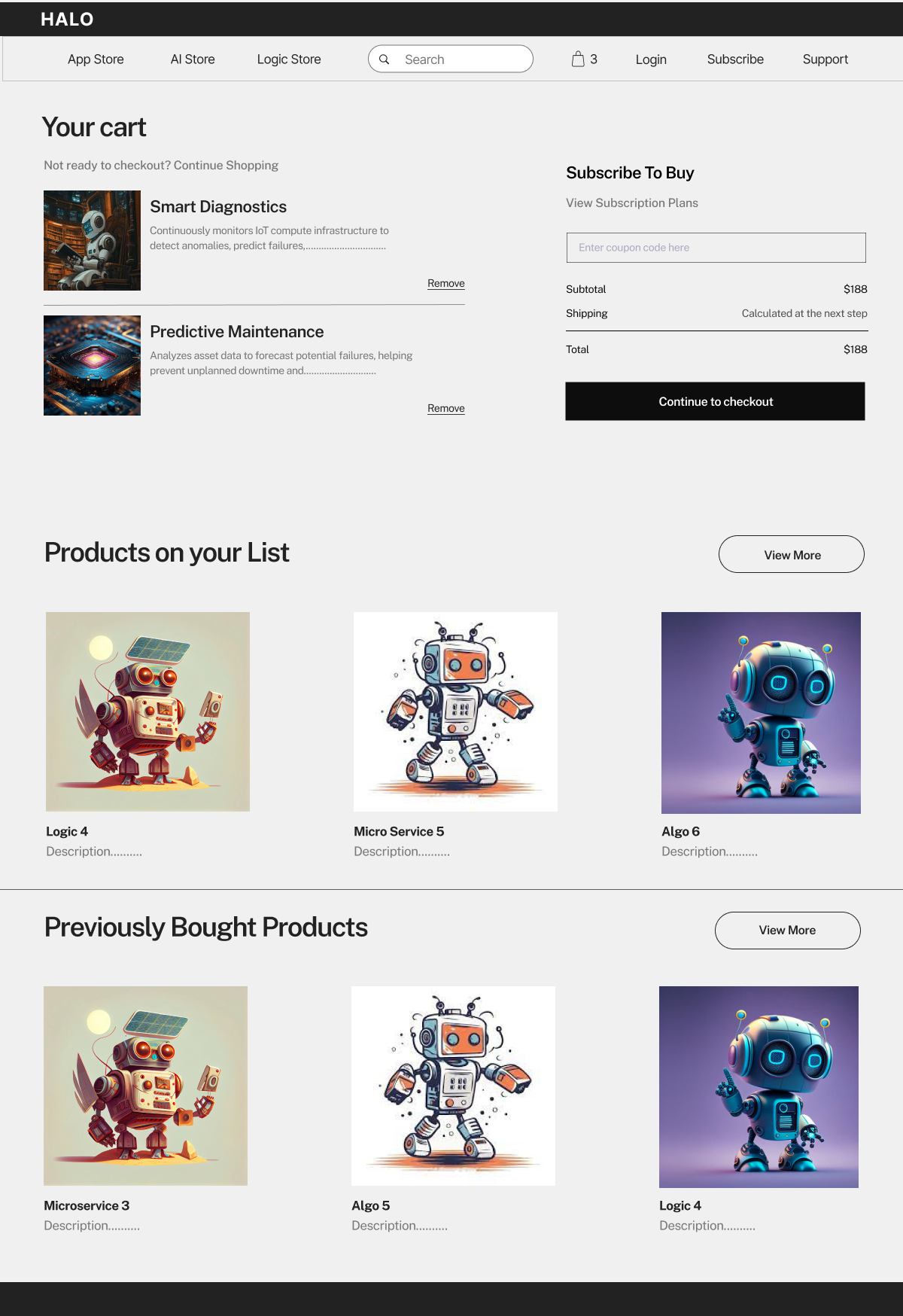
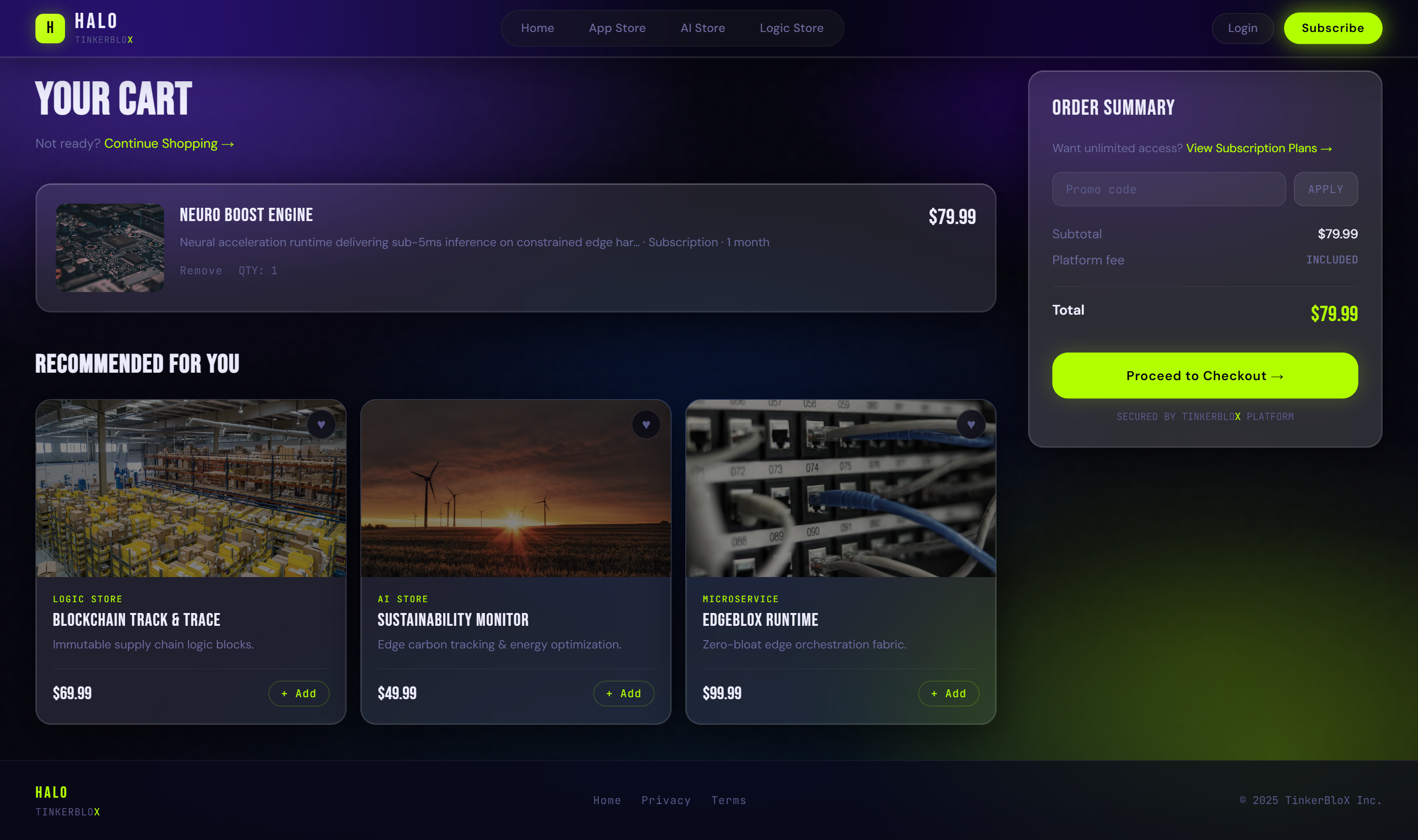
Cart
"Products on your List" + "Previously Bought" below the cart — enterprise buyers re-order and upsell across teams. This wasn't in the brief; I added it for repeat purchase behaviour.
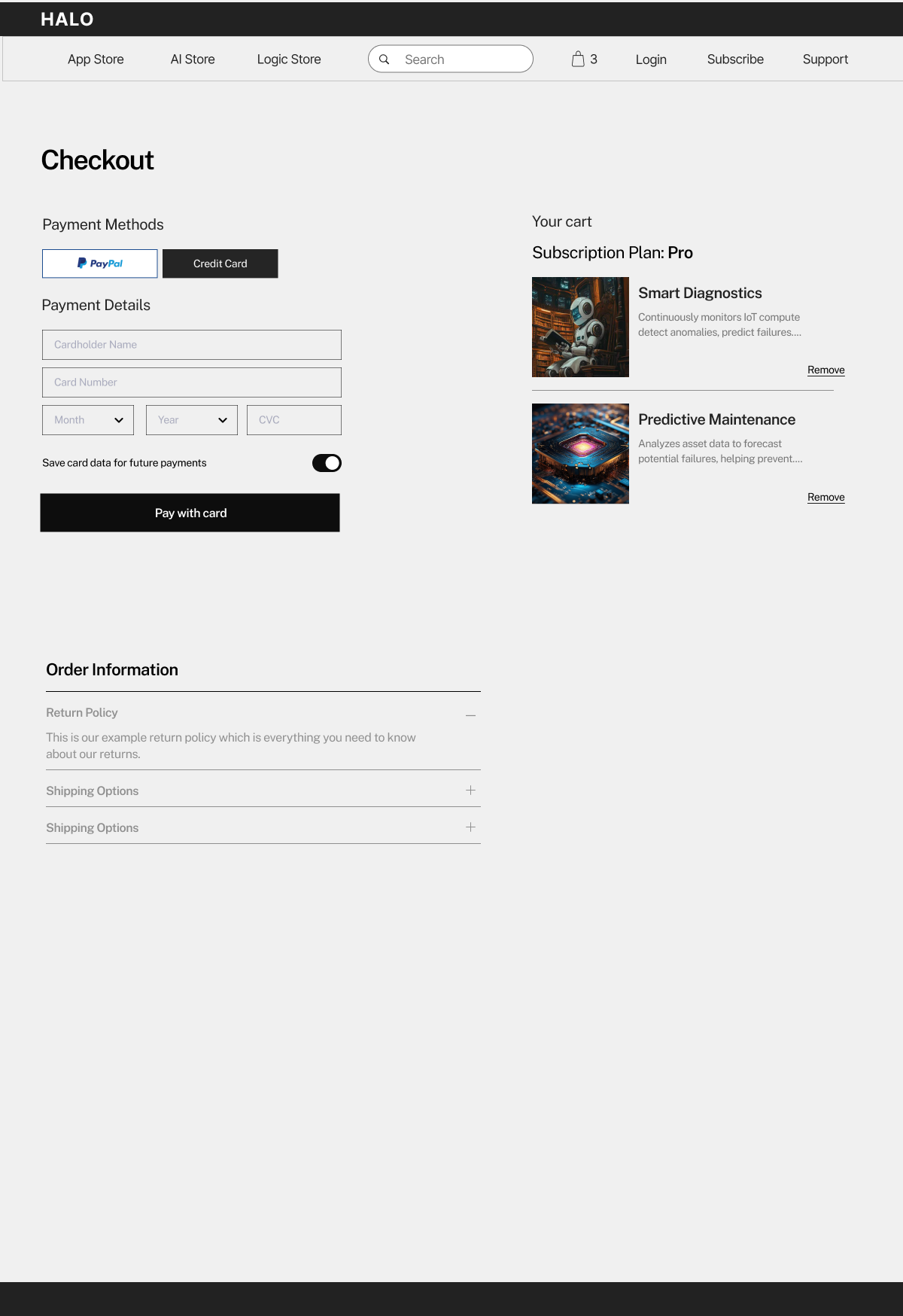
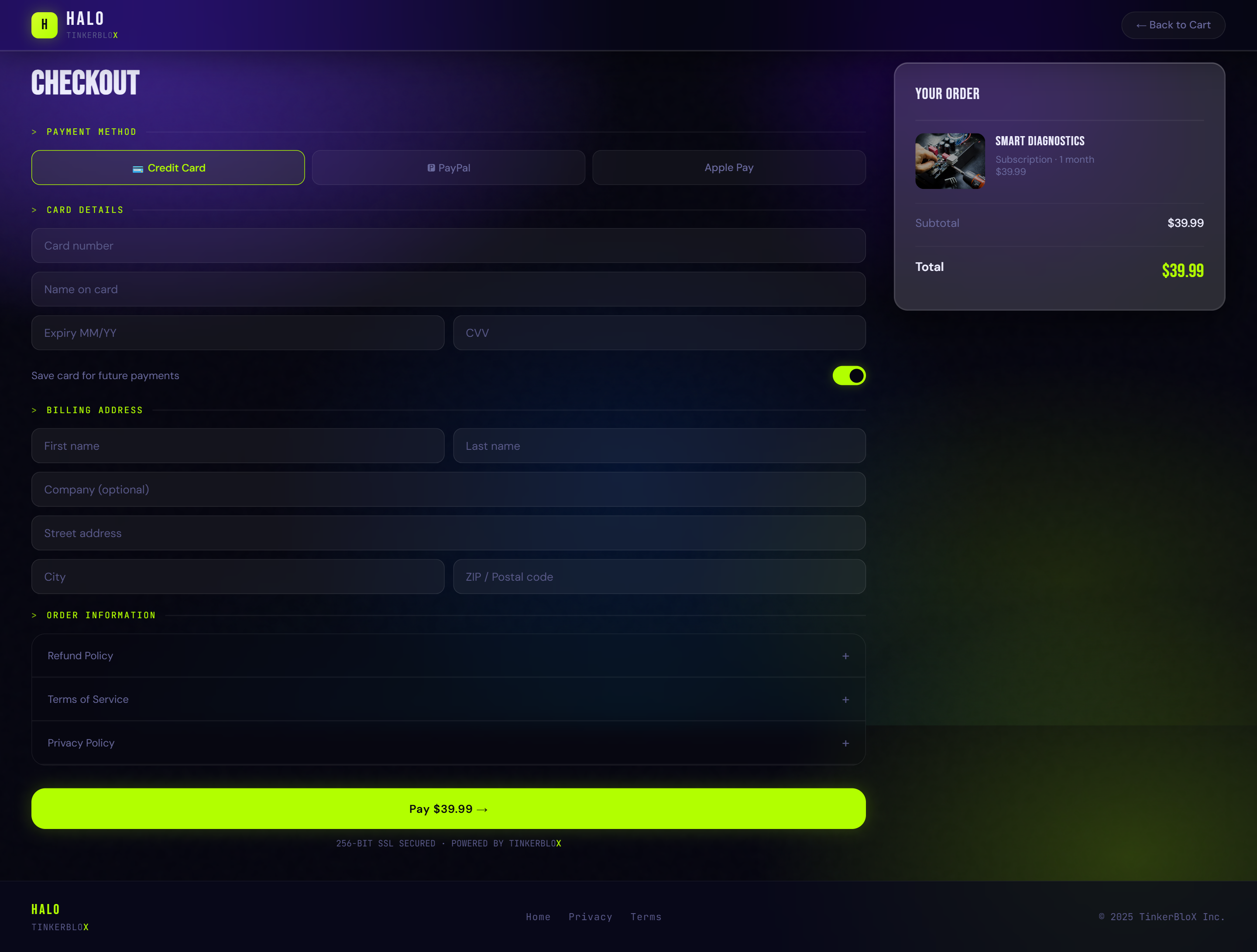
Checkout · Default
PayPal / Credit Card split. Enterprise teams often have corporate card mandates — both paths need to be first-class.
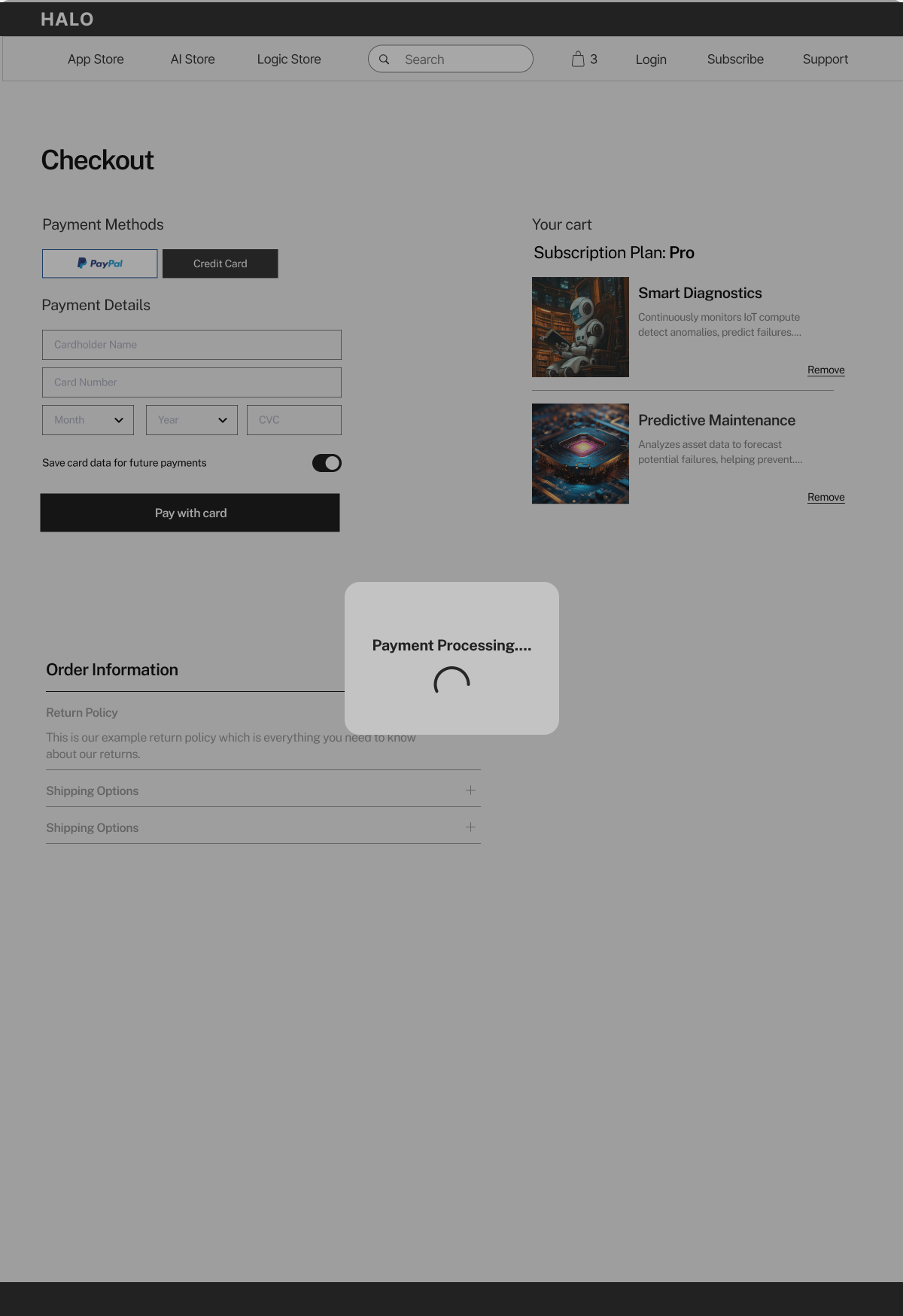
Checkout · Loading
Every state designed — not just the happy path. A blank screen during payment processing makes enterprise buyers anxious.
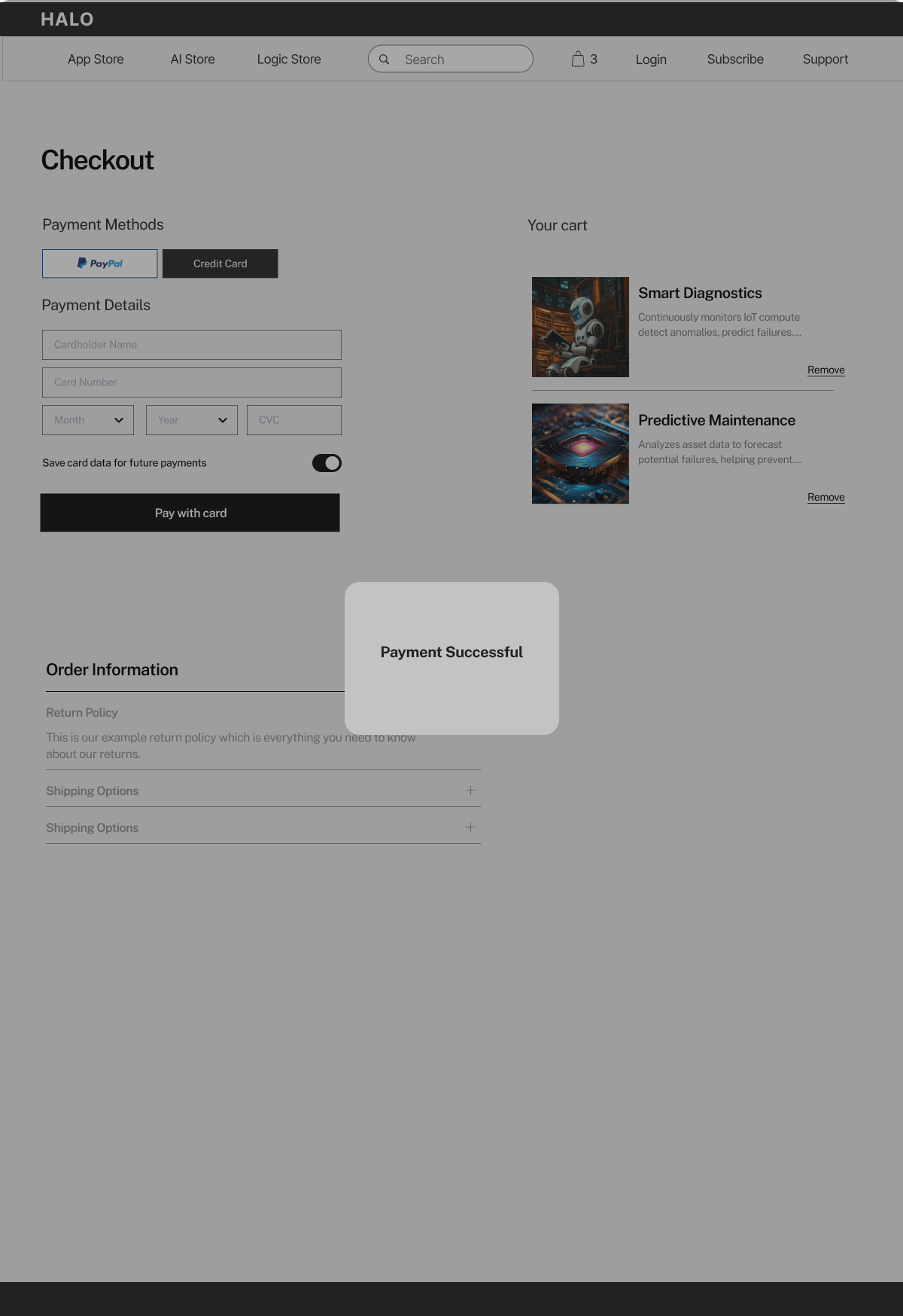
Checkout · Success
Unambiguous confirmation. In B2B, a failed or unclear payment triggers an ops ticket. The success state has to be loud and clear.
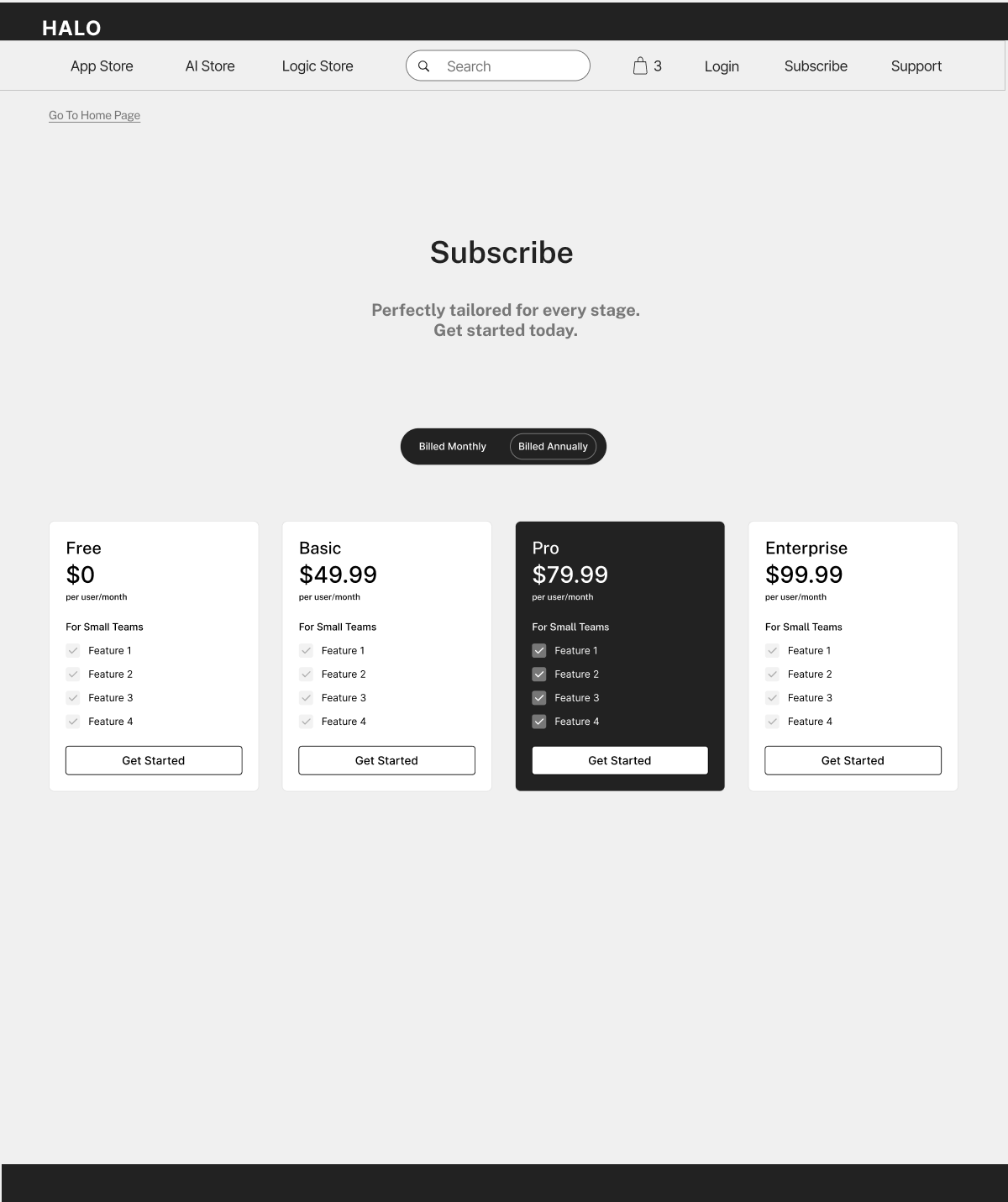
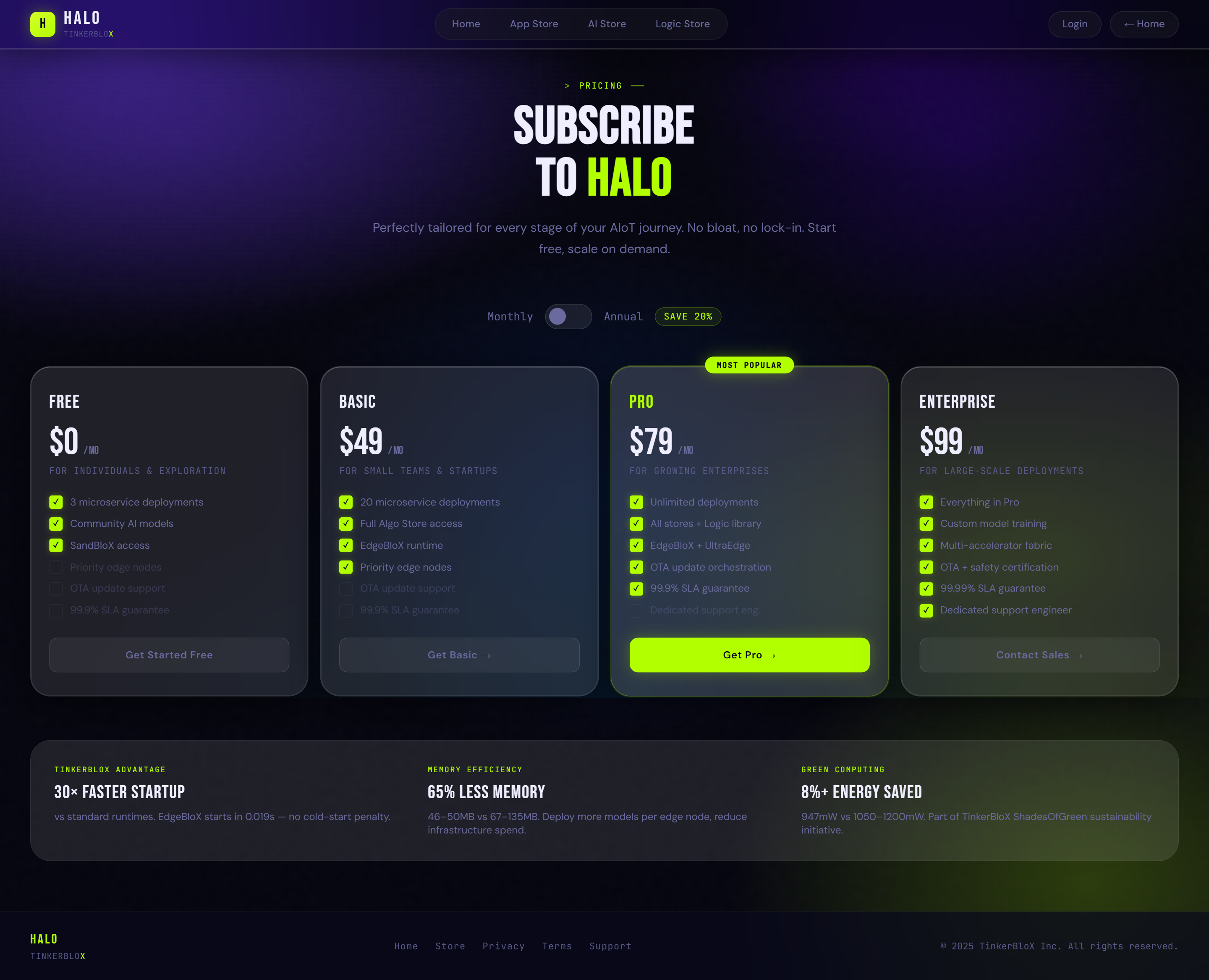
Subscribe · Pricing
4 tiers including Free — low barrier to adoption for a new marketplace. Monthly/annual toggle baked in from the start because enterprise budgets run on annual cycles. Enterprise tier anchors perception of the whole pricing page.
What came next
These wireframes were the brief. Everything above is what I asked Claude to build — with exact specifications for spacing, animation, interaction behaviour, and visual hierarchy on every single screen.
What my directions sounded like
Me →
"The top bar stays put as you scroll, with a gentle blur behind it so the buttons stay easy to read over any page. HALO logo on the left. Cart on the right, with a little number that ticks up the second you add something."
Me →
"The product cards should tilt a little as the mouse moves, so they feel like something you could pick up — but keep it subtle, not a gimmick."
Claude →
[built it]
the result ·
Eight screens. Shipped.
★
★ what shipped
Eight screens. Every one fully interactive. Real copy, real pricing, real empty states. Delivered before the investor meeting.
8 screens. Every one clickable.
01 · Home
02 · Product Detail
03 · Store
04 · Cart
05 · Subscription
06 · Checkout
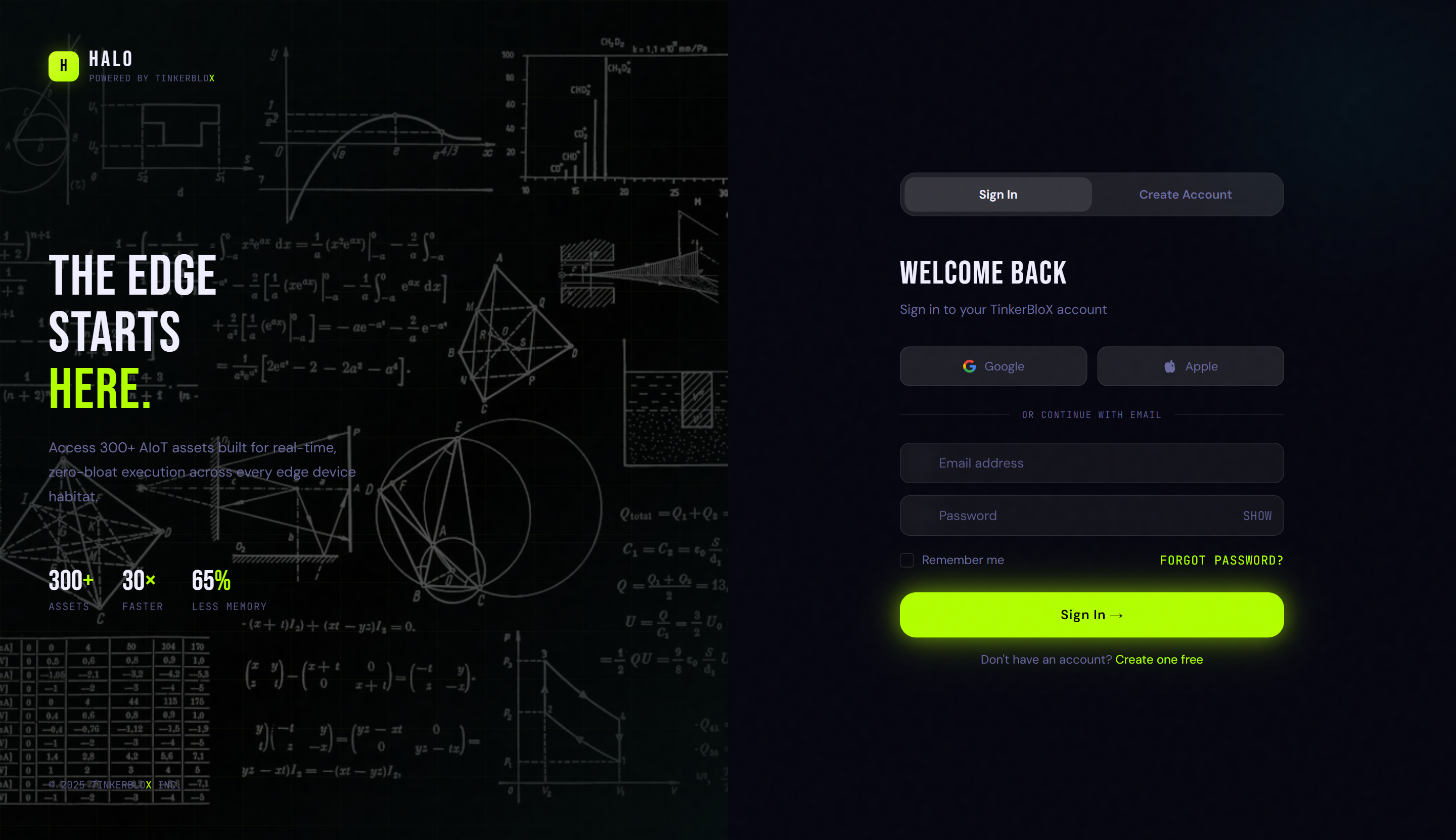
07 · Login
08 · Saved
↑ Click any screen to open the live prototype
wireframe → final
From sketch to shipped.
The wireframes defined every decision. The final prototype executed them. Here's what that translation looked like on three key screens.
Store — category browsingwireframe → final
Wireframe
Final prototype
Decision: The wireframe set up card-based browsing — three equal stores so people pick their aisle right away. The final kept that exact structure and just dressed it up: real product art, a bright accent, and cards that tilt a little. Same bones, but now it feels like a real product.
Cart — live purchase flowwireframe → final
Wireframe
Final prototype
Decision: The wireframe already had the "Subscribe to Buy" panel and a coupon field — both things the business needed. The final added real product images and, most importantly, a cart that updates the moment you add something. That little live count is the exact moment people go, "wait, is this actually built?"
Subscription — pricing tierswireframe → final
Wireframe
Final prototype
Decision: Four tiers including Free — low barrier to entry for a new marketplace. Monthly/annual billing toggle was in the wireframe from the start because enterprise teams plan on annual budgets; the toggle makes that switching moment tangible. The final used dark-on-light card contrast to signal which tier is recommended without forcing it.
★ the part that actually matters
★ ux audit
Once it was built, I went back through every screen and asked simple questions: what does the eye see first? does anything look unfinished? Three fixes made the biggest difference.
Built it. Then I picked it apart.
Product cards didn't guide the eye
Name and price were the same size, so nothing told your eye where to look first. I made the name bigger and gave the price its own colour — now it reads in order: what it is, then how much.
Empty screens looked broken
The cart and saved pages started out blank, and blank reads as "broken." I added simple empty-state art with a clear next step, so it always feels finished.
Colour contrast — readable for everyone
Bright lime pops on near-black, but a few of the faint grey labels sat too light to read comfortably. I checked every colour against WCAG contrast standards, darkened the weak greys, and made sure nothing relies on colour alone — so it works for low-vision users too.
UX audit mode
This is the part that actually matters. Anyone can ask an AI to "build a product card." The skill is knowing what your eye should land on first, what a hover should say, and why a little more breathing room makes something easier to read.
That judgement is the real design work. The AI just types it out.
★ the little moments
None of these were in the brief. I added them because each one quietly answers a question someone in that room would be asking — is this real? does it work? can I trust it?
Small touches. Each one earning its place.
Words that animate in — the homepage feels alive in the first second, before anyone reads a thing.
Cards that tilt with your cursor — the catalogue feels like something you can pick up, not a flat page.
A cart that updates live — add something and the total changes instantly, no reload. This is the moment people stop and ask, "wait, is this actually built?"
A billing toggle — flip between monthly and yearly and every price updates, so the pricing feels real in the room.
A calmer checkout — clear order of things so your eye lands on the payment step, the moment that matters most.
the impact ·
Not a demo. A blueprint.
★
★ impact
This wasn't a practice project. Real brief, real deadline, real meeting — here's what came of it.
One day. Real results.
01
Went to the investor meeting
The prototype was the heart of TinkerBloX's pitch. It made a product that didn't exist yet feel real — you could click it, price it, use it. Making people believe in something before it's built is the hardest thing a designer gets to do.
02
Handed off to dev team
After the pitch, the dev team used the prototype as their guide for the real build. Not a mood board, not a spec doc — a working thing they could click through, screen by screen.
03
Delivered in 1 day
8 screens, the interactions, a design system, and a proper UX pass — all in one working day. Not by cutting corners, but by only making the things that actually needed to exist.
04
Looked nothing like a demo
Real words, real prices, real empty screens, real interactions — no grey boxes or "lorem ipsum." It felt like something that had been in the works for months, not hours.
Here's the thing I took from it: the designer is part of the pitch too. When a product looks thought-through, people aren't only judging the tech — they're judging whether this team can pull it off. Good design quietly says "yes, they can."
★ what i'd do differently
The pitch went well and the build shipped. But with only a day, a few calls were made on instinct rather than evidence. If I did it again, here's where I'd slow down.
If I had it to do over again.
01
I'd talk to one real buyer first. I built the whole structure from looking at other marketplaces. I never actually asked an industrial buyer how they shop. Even one quick call would have told me if I'd guessed right.
02
I'd watch someone new try to buy something. Everyone who saw it already knew what HALO was. I never sat with a first-time user and watched them reach checkout on their own — and that's the test that surfaces the real friction.
I design interfaces, write copy, dream in animation, and occasionally vibe-code. I grew up in Bangalore — the kind of kid who paused Disney movies to study why a scene felt right. That curiosity became a Master's in Human-Centered Design from Pace University, and I'm still doing exactly that: figuring out why things feel the way they do, then making them feel better.
the dream
My dream job is at Disney. I'm being completely earnest. Growing up with Pixar and Disney taught me more about emotion, color, and storytelling than any textbook — the warmth of a Ratatouille frame, the way a single sequence makes you feel something before you understand why. That's the eye I bring to every screen I design. I notice color everywhere: on book covers, in the light at 5pm, in the spacing of a street sign. Design inspiration is just paying attention — and I can't stop.
"UX designing is the best IT job one can ever do — designing with concern for the business and the people. It is totally me."
when i'm not designing
I'm a dancer. I make digital art and I'm learning animation (slowly, joyfully). I read fiction obsessively — especially anything with a cover so beautiful I'd frame it. I watch romcoms unironically and more animation movies than is probably age-appropriate. I'm the kind of person who takes a while to open up — shy at first, then suddenly very much not shy. I care deeply about the people around me, which is probably why UX felt inevitable: it's the one job where caring about people is literally the job description.
the bigger picture
I want to open an organization to help people with disabilities — design access is something I feel strongly about. I also want to write a book someday (holding onto that one). I love teaching, love kids, and if you took design away I'd end up at a bookstore, a publishing house, or in front of a classroom. I'm a big dreamer. That's not a disclaimer — it's a feature.
★ currently open to roles · brooklyn, remote, or relocating
Let's make something great.
UX design · UX research · CX · product design · UX writing · full-time or contract
Tools I actually open every day. Not "things I've heard of" or "things that look good on a portfolio." These are the ones I'd miss.
01 · design
Figma
Where most of the thinking happens. I prototype, write, comment, and argue with myself in here.
02 · build
Cursor
For when the design needs to go past Figma. I vibe-code production sites here with Claude.
03 · think
Claude
My pair-thinker. I draft copy, sanity-check IA, pair on code. Currently writing this with it.
04 · prototype
Framer
For when a Figma proto isn't enough and a real codebase is too much. Lives in the middle.
05 · scaffold
v0
For getting from sketch to working component fast. Useful when the brief is "make me see it."
06 · keep
Notion
Project notes, research dumps, meeting recaps. Less elegant than I'd like, but it works.
07 · test
Maze
For unmoderated tests when I need numbers, not vibes. I still prefer interviews when I can get them.
08 · write
A pen
Muji 0.5 black, ideally. I think on paper before I think on a screen. Always have. Probably always will.
close ✕
I'm open to roles, briefs, and cold emails that aren't actually cold. If you have a product that matters and need a designer who will genuinely care about it — about the users — I would love to hear from you.
— with so much love (and cold brew) from brooklyn ♡
close ✕
★ now playing — irl
—
currently vibe-coding
a portfolio. this one. the recursion is, frankly, getting to me.
projectsupritha.design v.next
stackclaude · cursor · panic
cold brew#4 (don't tell anyone)
etasoon ™
★ how the sausage is made
my "process" (loose term)
It's a loop, not a line. Anyone who tells you design is linear is lying or selling you a workshop. Mine looks something like this on a good day. (On a bad day it's just step 5 again.)
01
read
Read everything.
The brief. The Slack threads. The complaints. The PRD nobody updated. Every dropdown label.
→
02
write
Write before drawing.
Microcopy first. If I can't say what the screen is for in plain english, the screen doesn't exist yet.
→
03
sketch
Sketch ugly.
Pen on whatever paper. Boxes and arrows. The faster it's ugly, the faster it stops being precious.
→
04
ship
Ship something.
Anything. Even incomplete-looking. Real users in five minutes beats a Figma file in six weeks.
→
05
fix
Fix it.
Read the data. Read the complaints. Then go back to step 1, because design is a loop, not a finish line.
↪ loop forever · until somebody pries it from your hands
★ three things i believe
three things I keep coming back to
№ 01
I steal colors from book covers.
I read a lot. Romance, fantasy, the literary stuff. The covers stacked next to my bed are my real color inspiration — not Figma Community.
Book covers do the same job we do: make someone feel something in three seconds. So when I need a palette, I look at my shelf first. This portfolio started there too.
№ 02
I don't follow the rules. The work is still good.
I didn't go to design school. I don't memorize frameworks. I sometimes pick a font because it just looks right.
What I have instead: taste, a lot of reading, and a willingness to throw out anything that isn't working. It works. People click.
№ 03
I think about users like they're my people.
I put people first in real life. That doesn't switch off when I open Figma. I'm not thinking about "the user" as a spreadsheet — I'm thinking about a real person trying to get something done on a Tuesday.
So empathy isn't a tool I add on top. It's just how I think.
that's how I think about it ♡ more on the wall
← back to the room
close ✕
★ the photobooth
Take a polaroid.
Click the button, smile (or don't), and you'll get a souvenir polaroid from this room. We'll need camera access — nothing's stored anywhere.
★ smile if you want to
Ready?
★ a souvenir
Here you go.
your souvenir from supritha's room — download to keep ↓
Your browser or device blocked the camera. To fix: open your browser Settings → Site permissions → Camera, and allow this site. Then tap "try again" below.